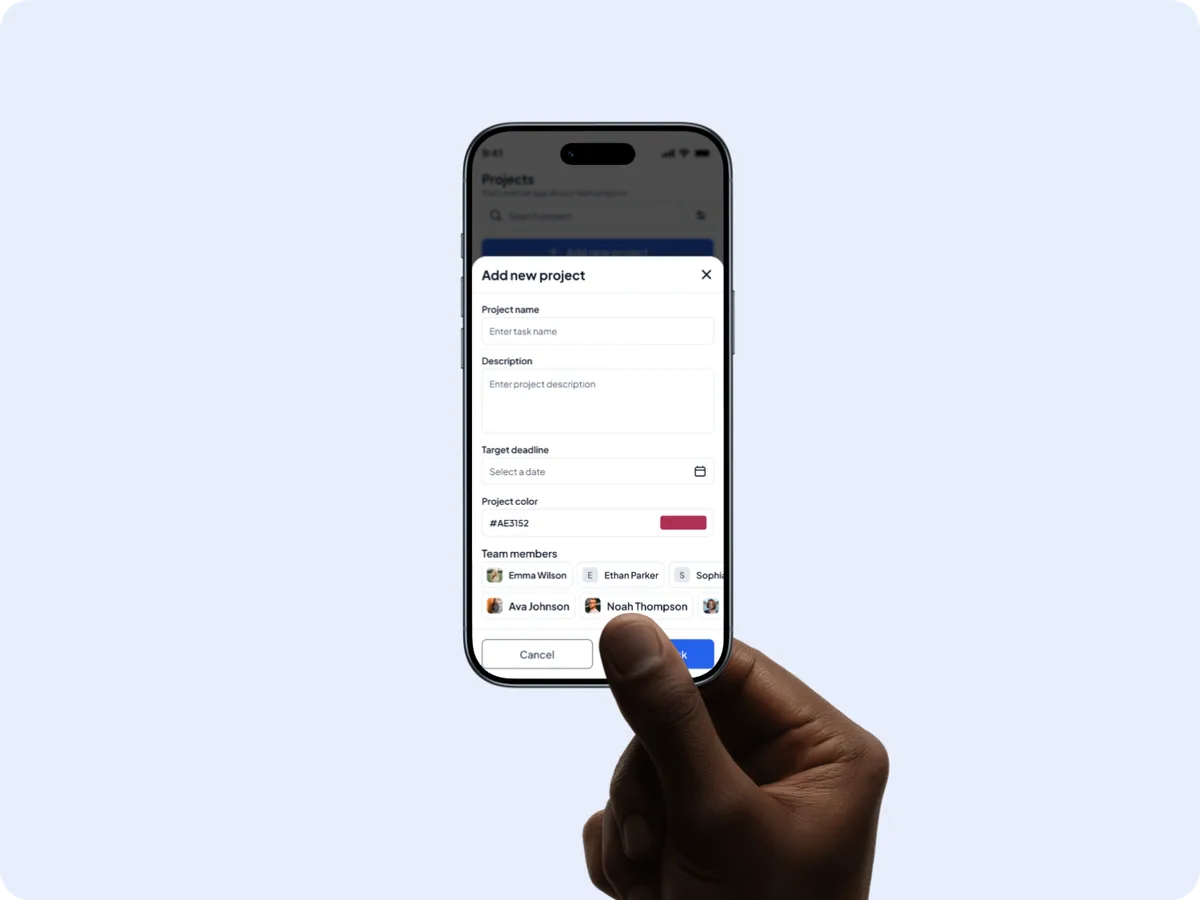
Project Management SystemUI/UX Case Study

Task Pulse — Project Management System Case Study

Task Pulse project management system shown on a laptop and iPhone — cover image
WebsiteMobile App

Project Overview

Task Pulse is a modern platform that helps teams manage projects efficiently across web and mobile.

About Project

This project involved designing a comprehensive project management system that enables teams to manage tasks, projects, workflows, and collaboration in one unified experience. The focus was on creating a scalable, intuitive interface that supports both high-level planning on desktop and quick task updates on mobile, without sacrificing clarity or performance.

Project Goal

To design a clean, intuitive, and efficient project management system that helps teams stay organized, track progress in real time, and collaborate effectively across devices. The goal was to deliver a consistent experience on both web and mobile, ensuring that users can plan work on desktop and take action on the go—while maintaining visibility, accountability, and momentum throughout the project lifecycle.

Problem & Solution

Problem

“Teams struggle with fragmented project tools, limited visibility across tasks and projects, and no clear understanding of ownership, progress, or upcoming deadlines.”

Solution 1

Task Pulse centralizes all projects and tasks into a single workspace, providing multiple views such as list and board so teams can plan, prioritize, and track work in a way that fits their workflow across web and mobile.

Solution 2

Real-time updates, comments, and task assignments keep everyone aligned, while progress indicators, workload visibility, and deadline alerts help teams identify risks early and stay on track.

Solution 3

Task Pulse is designed as a cross-platform experience, allowing users to plan and monitor work on the web while enabling quick actions—such as updating task status, commenting, and receiving notifications—on mobile, ensuring productivity continues beyond the desktop.

Research

Unclear ownership across tasks and projects

Teams often lose track of who is responsible for what. Tasks move between people and projects without clear ownership, leading to delays, duplicated work, and missed deadlines—especially as teams scale.

Slow progress visibility for managers

Project managers struggle to quickly understand project health. Important signals like blocked tasks, overdue work, or uneven workloads are often buried deep inside dashboards, making timely decision-making difficult.

Mobile experience limited to viewing, not acting

Many project management tools treat mobile as a secondary platform. Users can view tasks but cannot easily update status, comment, or take action, reducing productivity when teams are away from their desks.

Defining the Product Direction

What are we solving?

Teams managing multiple projects often lack a single, reliable system to track tasks, progress, and responsibilities. Information lives across tools, making it difficult to understand what needs attention and what is already on track.


How do we approach it?

By designing a unified workspace that brings projects, tasks, and teams together—with clear ownership, real-time progress signals, and consistent flows across web and mobile.

Who is this for?

Task Pulse is designed for project managers, designers, developers, and cross-functional teams who need structure, transparency, and flexibility while working across web and mobile environments.

Why does it matter?

When visibility is limited, teams lose time, miss deadlines, and rely heavily on manual follow-ups. Over time, this creates inefficiency, stress, and inconsistent project outcomes.

Goal

To design a unified project management system that helps teams plan, track, and deliver work with clarity and confidence across web and mobile. The goal was to reduce complexity, improve visibility, and enable seamless collaboration throughout the project lifecycle.

User Personas

Sarah Mitchell — a project manager user persona for Task Pulse

Sarah Mitchell

Project Manager

8+ years managing cross-functional teams

“I need a system that gives me a clear view of progress, ownership, and deadlines—without constantly chasing updates from the team.”

Behaviour

  • Manages multiple projects at the same time with cross-functional teams.
  • Starts her day reviewing dashboards to understand project status and risks.
  • Regularly assigns tasks, adjusts priorities, and tracks deadlines.
  • Collaborates closely with stakeholders and relies on accurate progress updates.

Needs & Goals

  • Needs a centralized platform to create, assign, and track tasks effortlessly.
  • Wants real-time visibility into project progress and team workload.
  • Looks for collaboration features that reduce meetings and follow-ups.
  • Requires clear reports and timelines to make informed decisions quickly.

Pain Points

  • Finds it difficult to track progress when information is spread across tools.
  • Loses time following up on task updates and unclear ownership.
  • Feels overwhelmed by complex tools with unnecessary features.
  • Struggles to maintain visibility when teams work remotely or across time zones.
Alex Carter — an operations executive user persona for Task Pulse

Alex Carter

Operation Executive

4+ years managing operations

“I want a simple way to see what I need to work on and update my progress without switching between multiple tools.”

Behaviour

  • Works on multiple projects simultaneously as an individual contributor.
  • Checks tasks frequently throughout the day, often from a mobile device.
  • Updates task status, adds comments, and reviews feedback as work progresses.
  • Collaborates with designers, developers, and project managers remotely.

Needs & Goals

  • Needs a clear, prioritized task list with deadlines and ownership.
  • Wants to update task status quickly with minimal effort.
  • Looks for an app that works seamlessly on both web and mobile.
  • Needs timely notifications to stay aligned with project updates.

Pain Points

  • Feels overwhelmed when tasks are unclear or poorly prioritized.
  • Misses important updates when communication is scattered across tools.
  • Finds many project management apps too complex for daily use.
  • Struggles with mobile apps that allow viewing but not taking action.

Competitive Analysis

We reviewed leading project management tools to understand how teams plan, track, and collaborate today. The analysis helped identify usability gaps and opportunities to design a more focused, efficient, and cross-platform experience with Task Pulse.

Target Audience Fit
Ease of Use
Onboarding Simplicity
Customization
Workflow Setup
UX Clarity & Focus
Comparative project management tool logo
Engineering & development teams
Steep learning curve
Complex setup
Highly customizable
Multiple steps required
Dense interface
Comparative project management tool logo
General teams, product & marketing
Intuitive and approachable
Simple onboarding
Limited customization
Quick and straightforward
Lacks focus for complex workflows

Process

Designed to turn complex
project workflows

“Task Pulse was built with a strong focus on usability, scalability, and real-world team workflows—ensuring every interaction helps teams move work forward with confidence.”

Research

We started by understanding how teams manage projects across different tools and devices. Through competitor analysis and workflow mapping, we identified friction points such as unclear task ownership, delayed updates, and limited visibility when switching between web and mobile environments.

Design

Design decisions were guided by clarity and efficiency. We explored multiple layouts, task views, and interaction patterns to ensure information is easy to scan and actions are quick to perform. Iterations focused on reducing cognitive load, improving navigation, and maintaining consistency across platforms.

Outcome

The final experience delivers a unified project management system that balances powerful planning tools on the web with fast, focused interactions on mobile. Task Pulse enables teams to stay aligned, track progress in real time, and collaborate seamlessly—no matter where they work from.

Logo

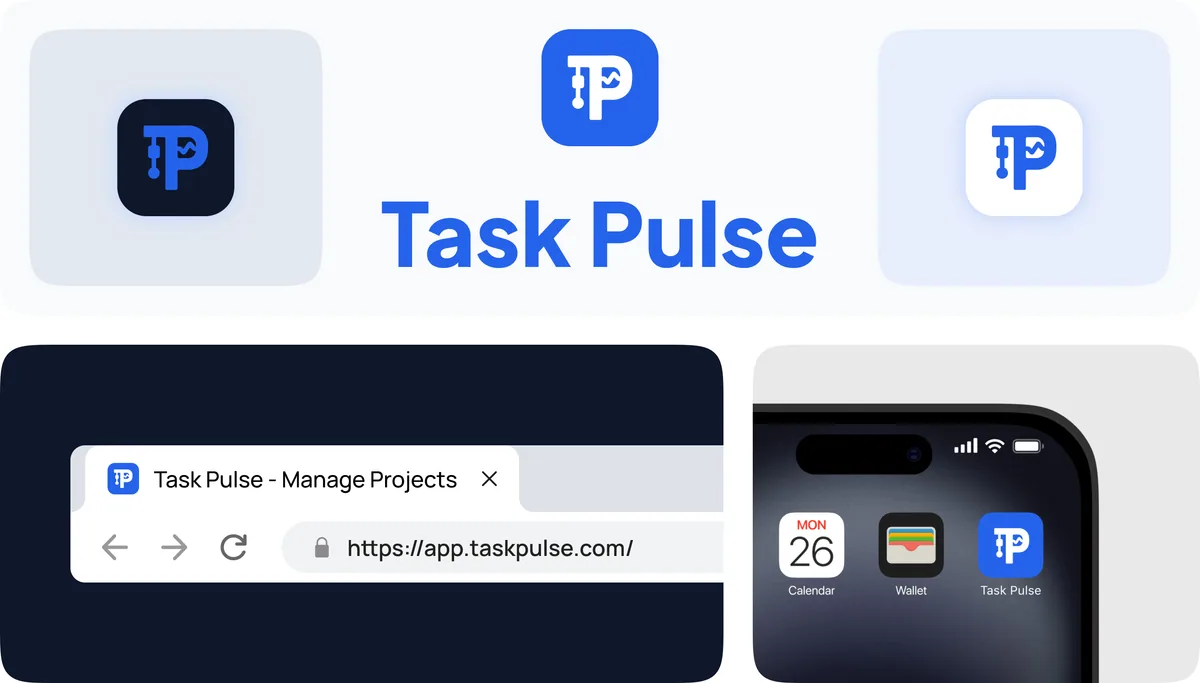
The Task Pulse logo is built around a custom “TP” monogram, designed to represent structure, flow, and momentum. The integrated pulse line symbolizes continuous progress and real-time task movement, reinforcing the idea of work staying active and on track. Strong geometric forms ensure clarity and scalability across web, mobile, and product interfaces. The mark reflects Task Pulse’s core promise: clear workflows, steady progress, and reliable execution.

Task Pulse brand bento — logo monogram, app icon, iPhone home screen, and browser treatment

Typography

Plus Jakarta Sans

RegularMediumBold

0123456789

abcdefghijklmnopqrstuvwxyz

ABCDEFGHIJKLMNOPQRSTUVWXYZ

Color Palette

2563EB
6366F1
14B8A6
F59E0B
F8FAFC
E2E8F0
EF4444

High Fidelity UI Screens

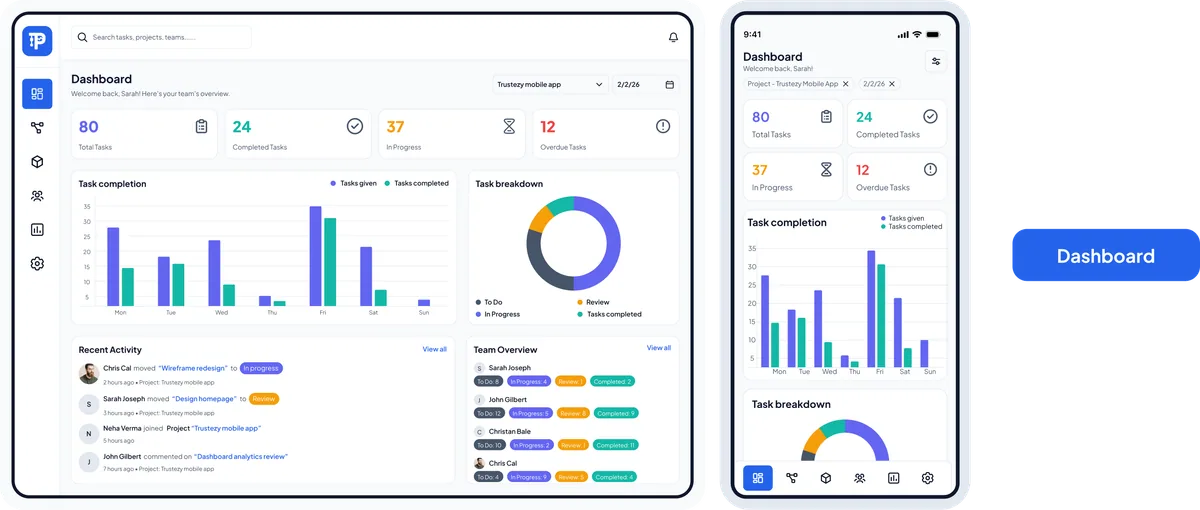
Dashboard

A unified overview of team progress — tasks at a glance, completion trends, and recent activity — so managers can spot risks early without digging through reports.

Task Pulse dashboard screen on web and mobile showing task metrics, completion charts, and recent activity

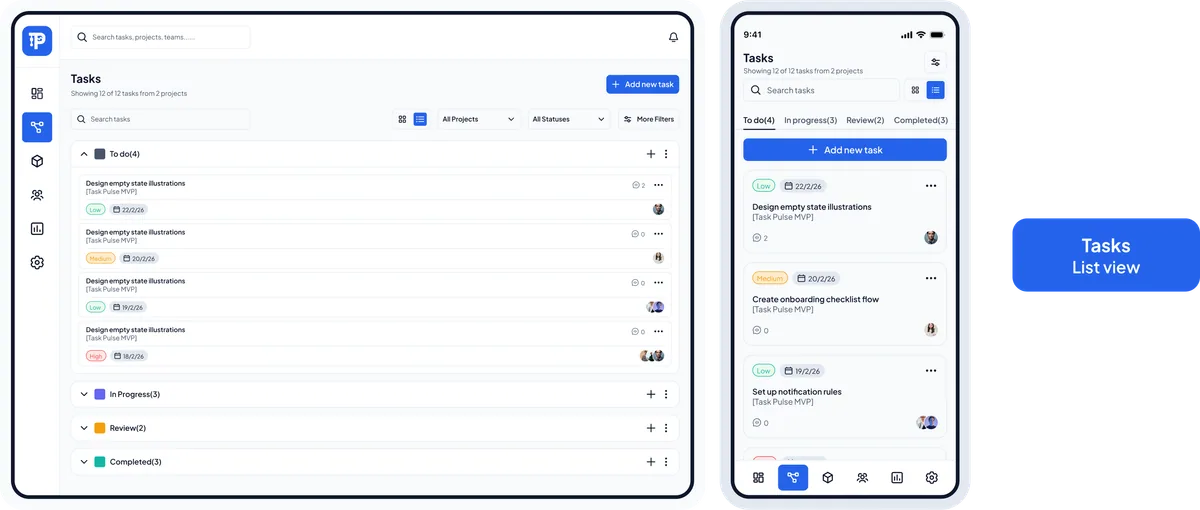
Tasks — List View

A focused list of every task with owner, status, priority, and due date. Built for quick scanning, inline updates, and keeping momentum on daily work.

Task Pulse tasks list view on web and mobile showing task owners, priorities, and deadlines

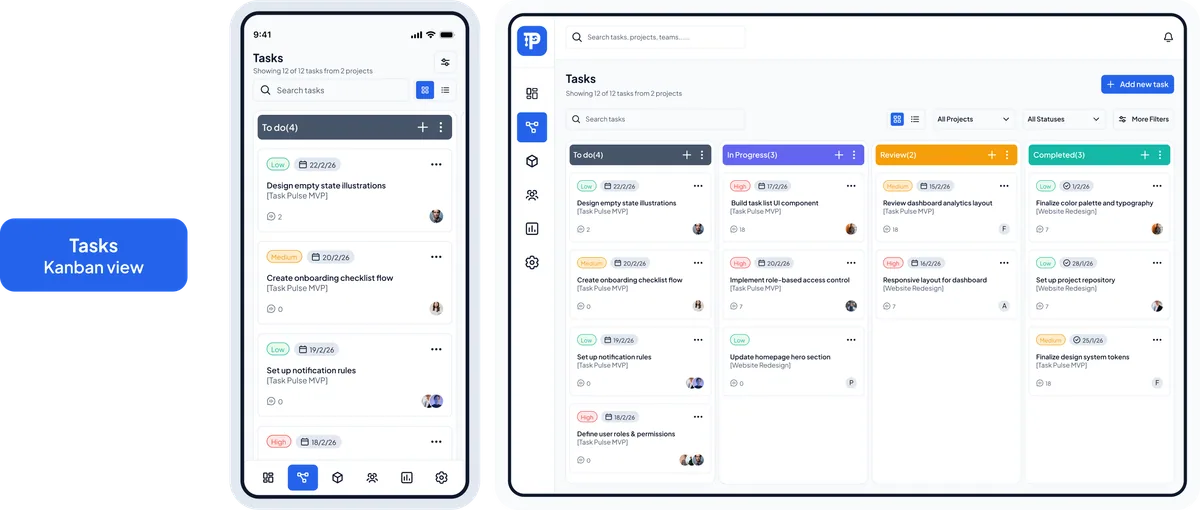
Tasks — Board View

A Kanban-style board for visual planning. Move tasks through stages, balance workload across the team, and see bottlenecks in one glance.

Task Pulse tasks board view on web and mobile showing Kanban columns and workload distribution

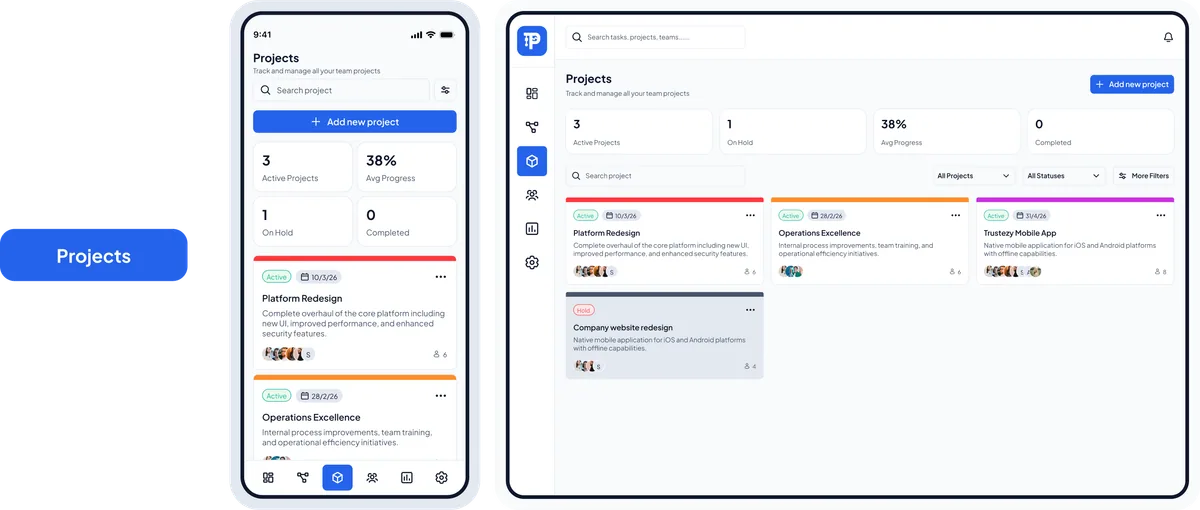
Projects

A project-level workspace that brings goals, timelines, team members, and related tasks together — keeping everyone aligned on what matters most.

Task Pulse projects screen on web and mobile showing project details, timeline, and member list

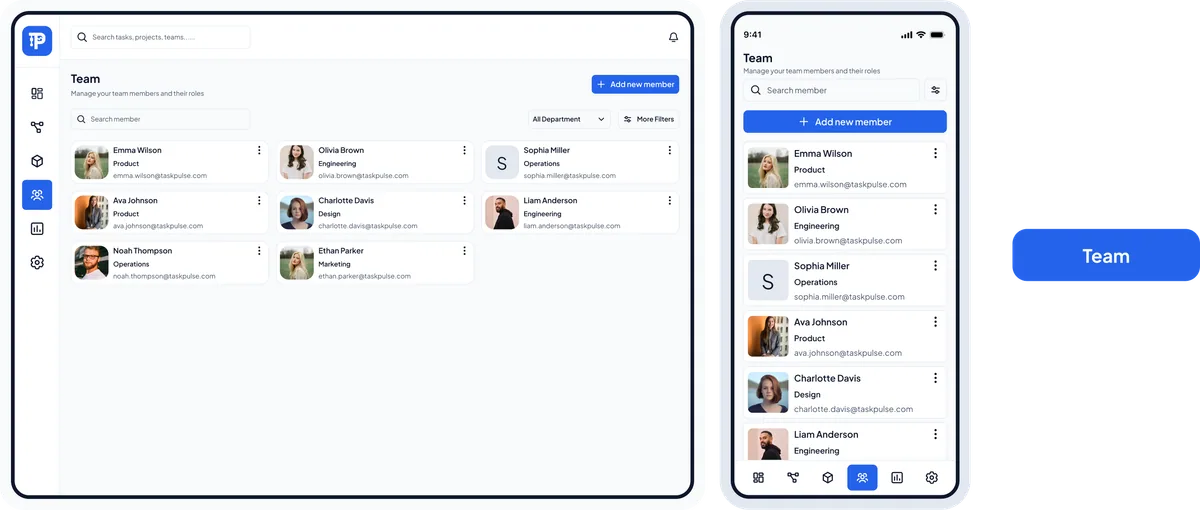
Team

A directory of every team member with roles, availability, and workload, so leads can assign work fairly and collaborate without friction.

Task Pulse team screen on web and mobile showing members, roles, and workload
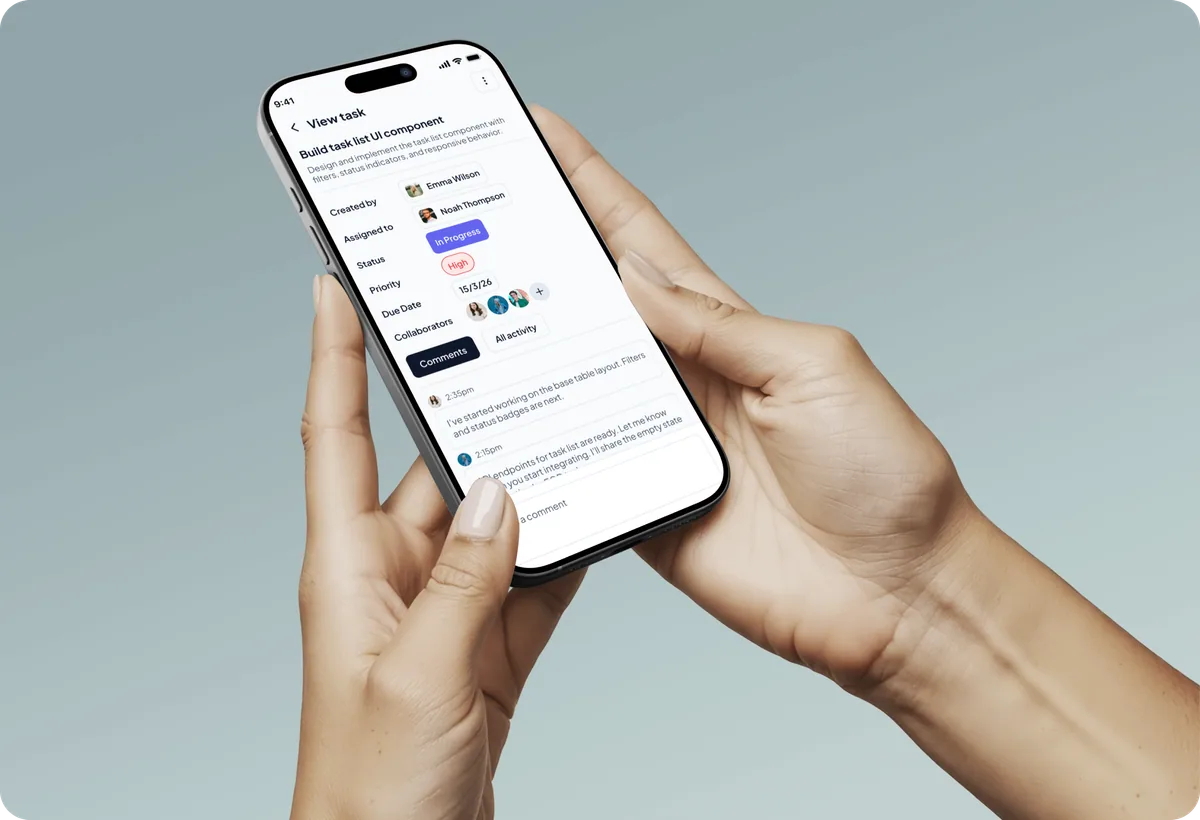
Task Pulse mobile app shown on an iPhone 16 Pro held in hand
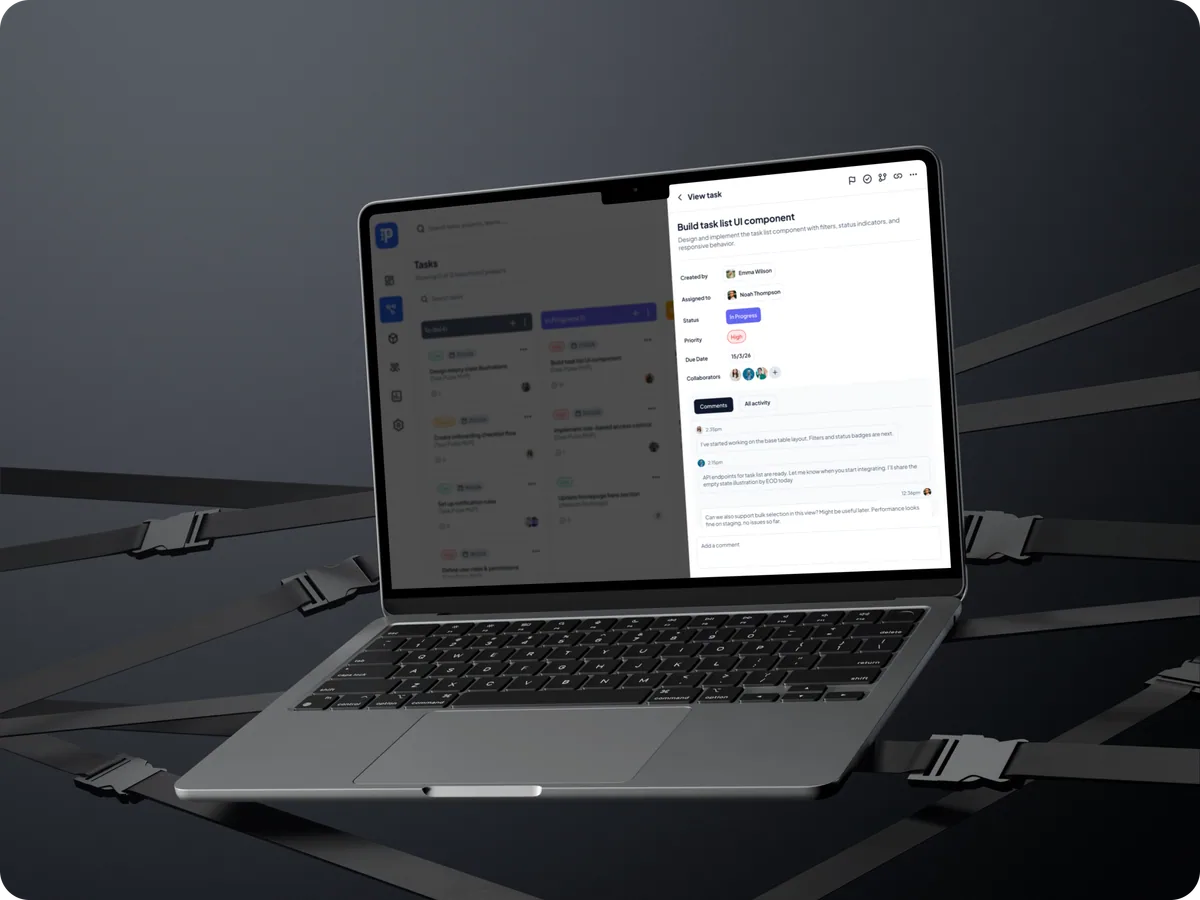
Task Pulse web dashboard shown on a MacBook Air
Task Pulse mobile app shown on an iPhone Air
Let's Work Together

Have a Project in Mind?

We design and build digital products that solve real problems — from concept to launch. Tell us about your idea and let's bring it to life together.

50+

Projects Delivered

30+

Happy Clients

9+

Years of Experience

15+

Team Members