Data Migration Complexity
Migrating millions of records from legacy Oracle systems to modern databases without disrupting operations.
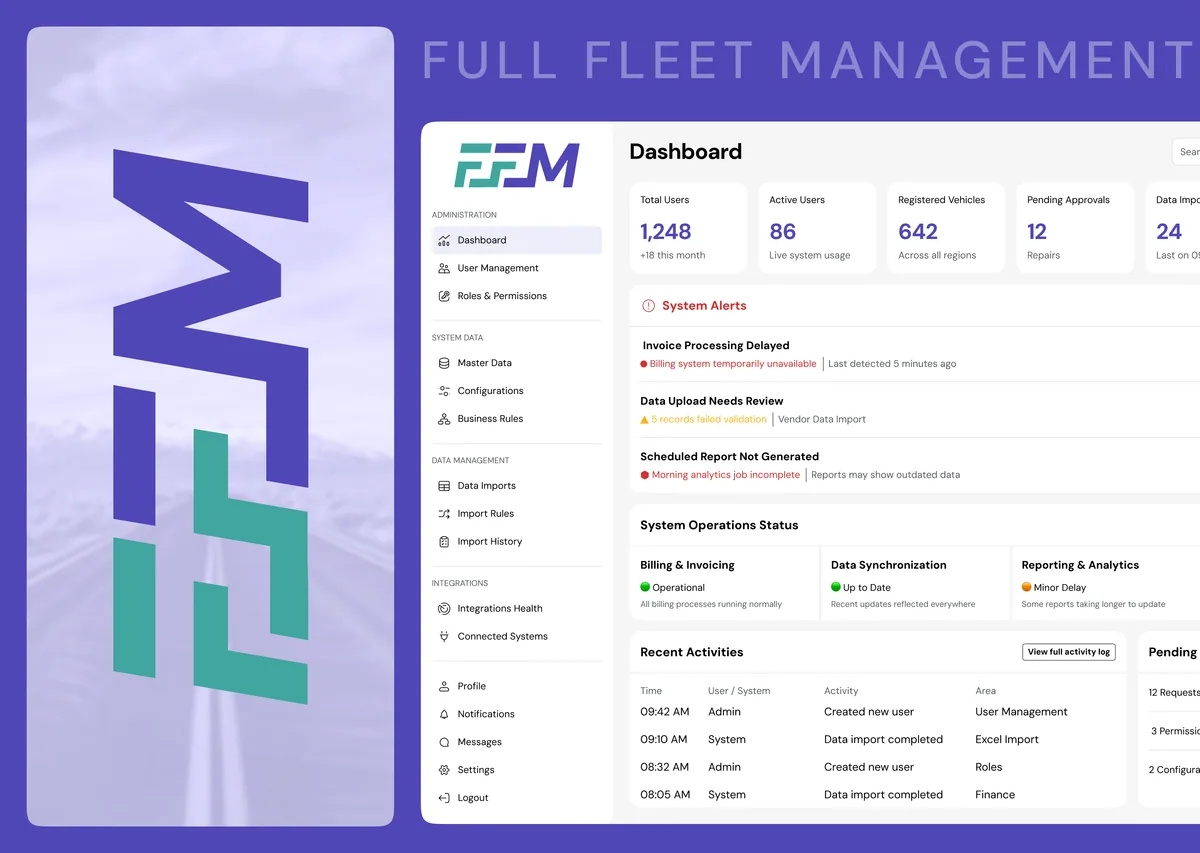
Full Fleet Management (FFM) is an all-in-one 🚚 fleet management platform designed to streamline complex transportation operations for logistics providers, fleet operators, and vehicle leasing organizations.
It enables real-time fleet visibility, optimized dispatching, predictive maintenance management, and financial oversight across large vehicle networks.
WHY FULL FLEET MANAGEMENT?
FFM centralizes fleet operations into a unified platform, improving vehicle utilization, reducing operational delays, and enabling data-driven decision making across dispatch, maintenance, and financial workflows.
PROBLEM STATEMENT
Migrating millions of records from legacy Oracle systems to modern databases without disrupting operations.
Dispatching and maintenance scheduling relied heavily on spreadsheets and manual coordination.
Fleet managers could not monitor vehicle status or trip progress in real time.
Slow APIs and database queries impacted operational speed and decision making.
Large Excel imports required custom mapping and validation processes.
Existing tools lacked proper integration across fleet, accounts, maintenance and dispatch operations.
SYSTEM USERS
Super Admins manage the entire platform infrastructure including system configuration, user management, integrations, and operational policies. They ensure the platform operates securely and efficiently across all modules.
Operations Managers coordinate daily fleet activities including trip assignments, dispatch planning, and monitoring ongoing trips. They ensure drivers, vehicles, and routes operate efficiently.
Fleet Managers oversee vehicle availability, utilization, and performance across the fleet. They track vehicle status, optimize usage, and ensure operational readiness of the fleet.
Maintenance Managers handle preventive maintenance schedules, work orders, repairs, and spare parts inventory. Their goal is to minimize vehicle downtime and maintain fleet reliability.
Finance teams handle budgeting, cost tracking, and financial reporting related to fleet operations. They ensure accurate accounting, compliance, and financial optimization.
Drivers execute assigned trips, update delivery statuses, upload operational documents, and report issues during trips. Their actions ensure successful shipment delivery and real-time trip tracking.
Clients monitor assigned vehicles, track service usage, download invoices, and submit service requests. They gain visibility into fleet services and operational performance.
SYSTEM ECOSYSTEM
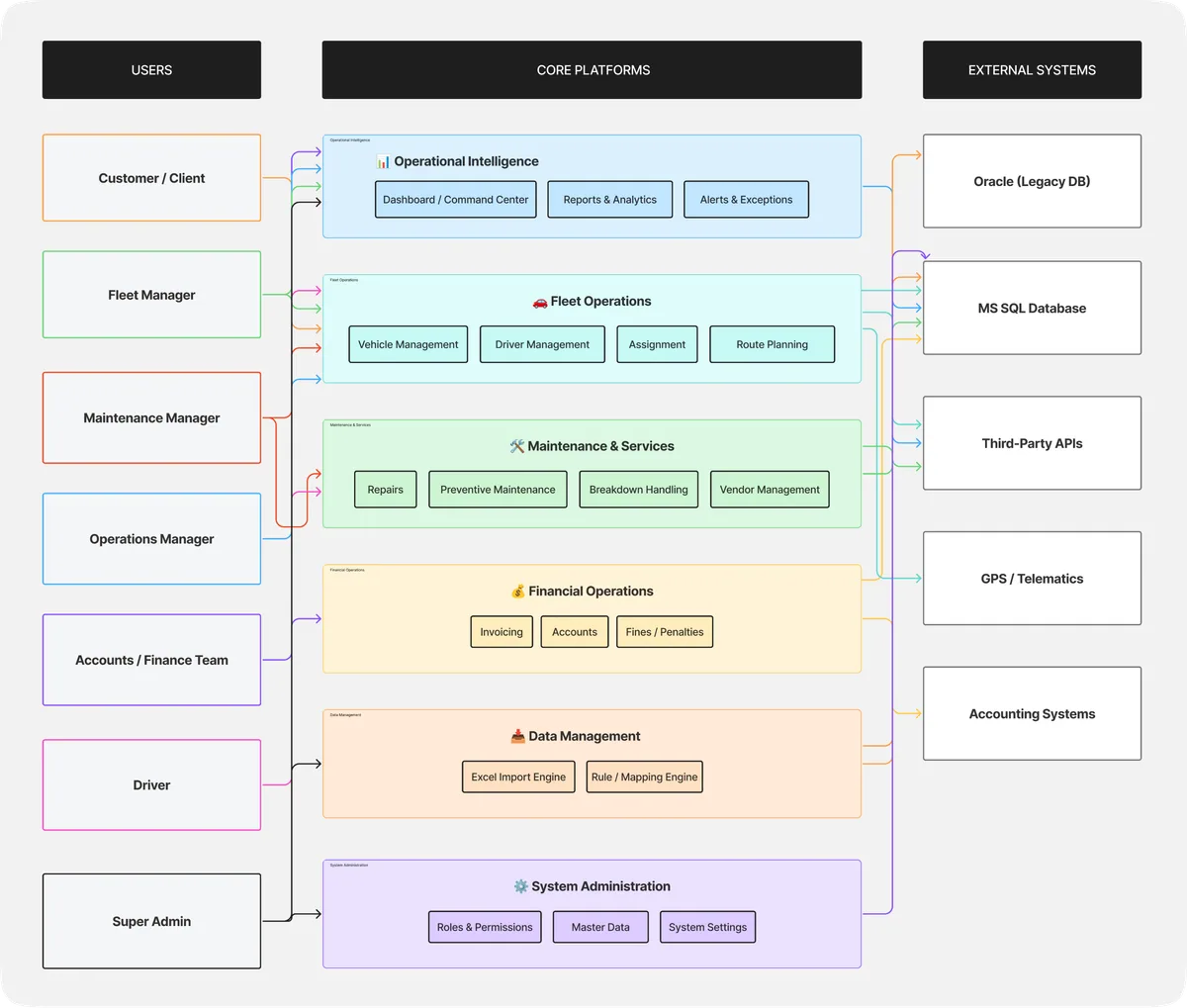
ROLE RESPONSIBILITIES
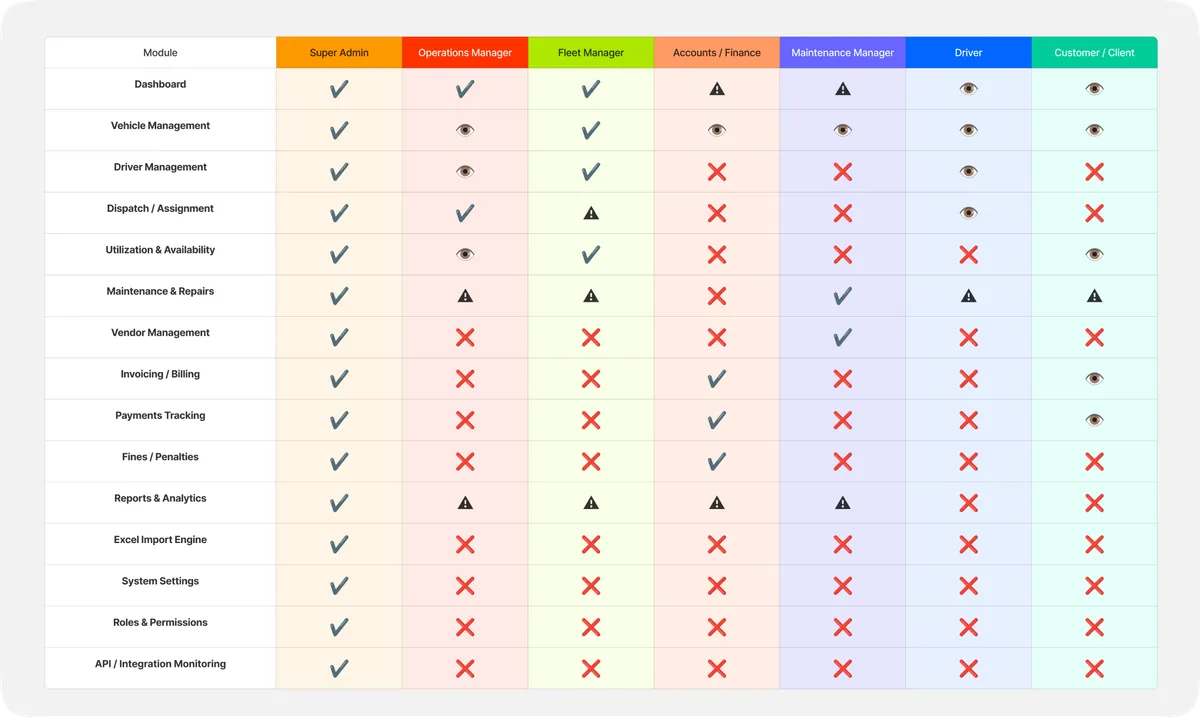
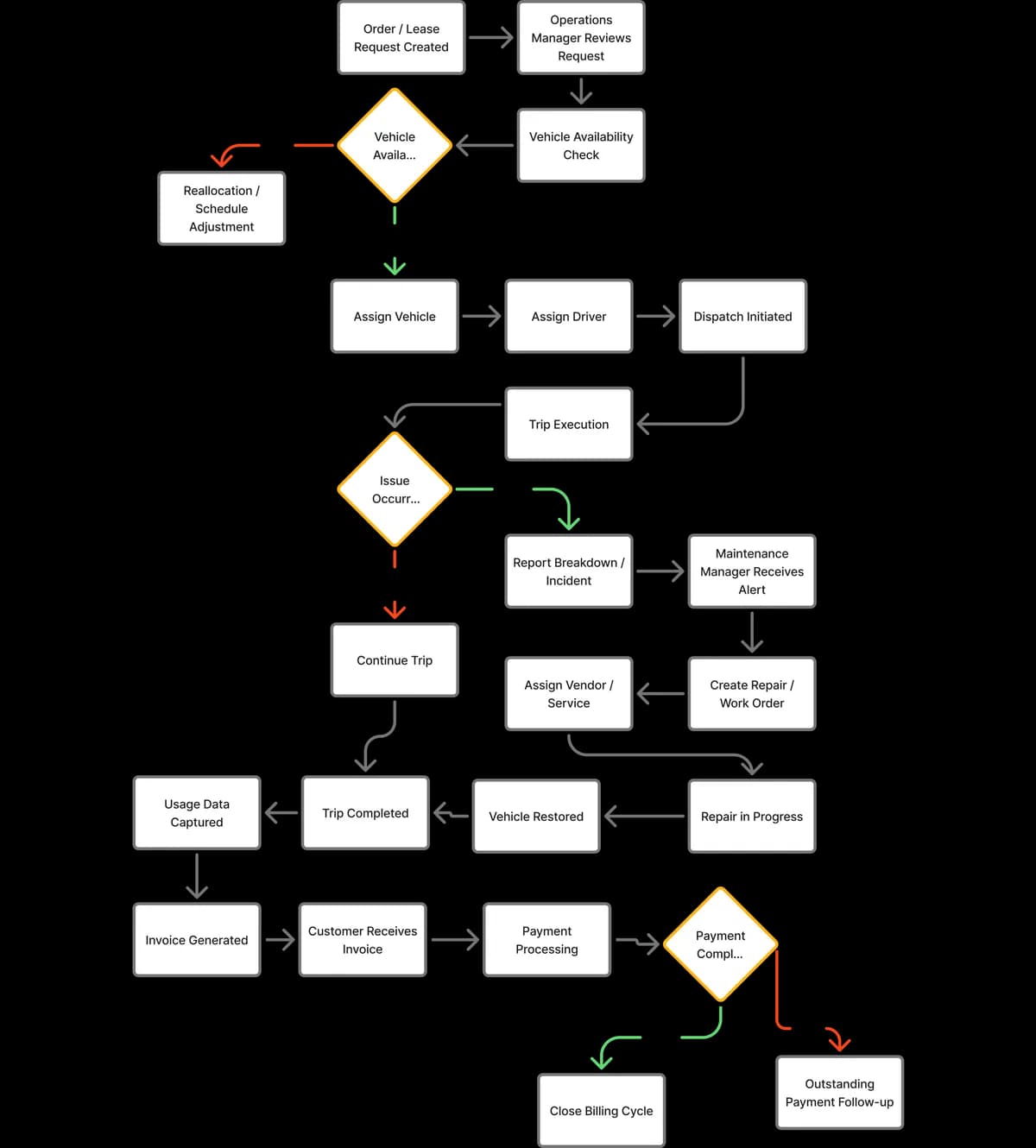
OPERATIONAL WORKFLOW
DESIGN PROCESS
VISUAL FOUNDATION

LOGO BRANDING
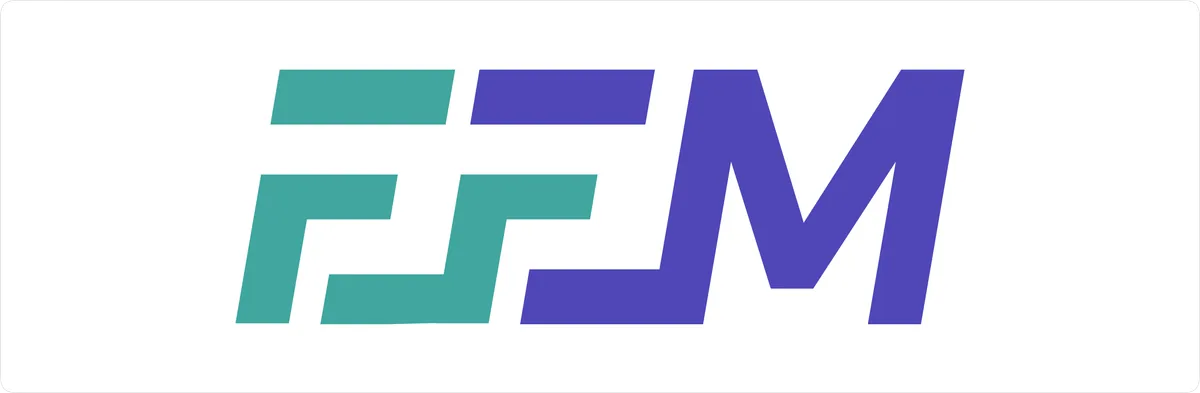
The logo is built around the initials “FFM”, representing Full Fleet Management.
The stylized shapes within the first two letters introduce angled cuts that resemble forward movement and directional flow, symbolizing vehicle motion and operational progress.
This visual language reflects the platform’s core purpose optimizing fleet movement, monitoring operations, and connecting logistics workflows.
Teal represents operational efficiency and logistics movement, while violet reflects technology and system intelligence.
The platform is designed to streamline complex fleet operations by simplifying workflows and reducing manual processes.
The platform is designed to provide a stable and dependable operational environment for fleet management teams.
Representing the integrations of vehicles, drivers, maintenance and finance into one problem.
The visual identity reflects the platform’s foundation as a modern digital system built for enterprise fleet operations.
PRODUCT INTERFACE
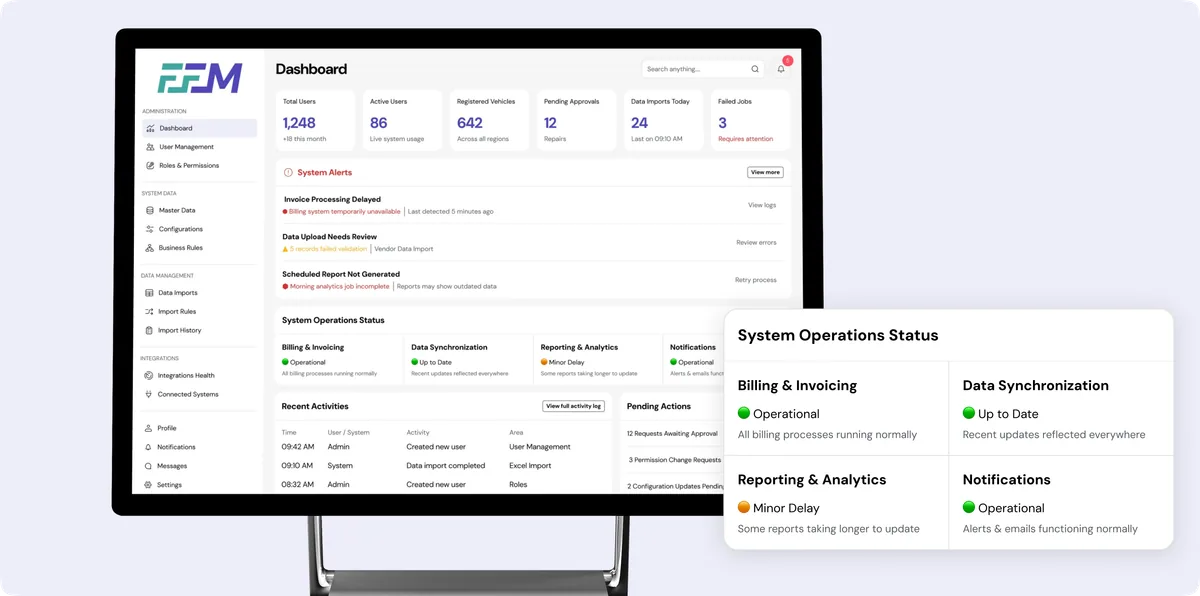
The Admin Dashboard provides a centralized overview of platform activity and system health. It enables administrators to monitor key metrics such as users, fleet data, and data imports while quickly identifying system alerts or operational issues. The dashboard also highlights recent activities, system status, and pending administrative actions, allowing administrators to manage the platform efficiently from a single control interface.
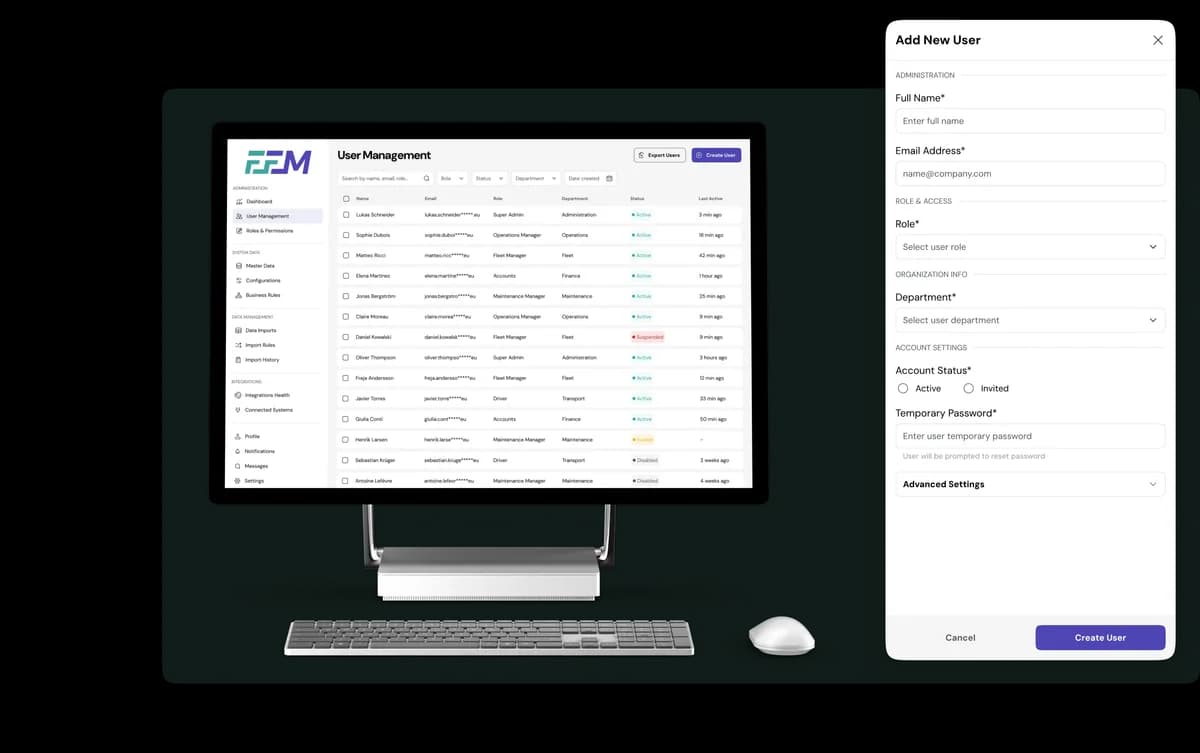
The User Management module allows administrators to efficiently manage platform users across different roles and departments. Administrators can view user details, monitor account status, and apply filters to quickly locate specific users. The interface also provides the ability to create new user accounts through a structured form where roles, departments, and access settings can be assigned, ensuring proper permission control across the platform.
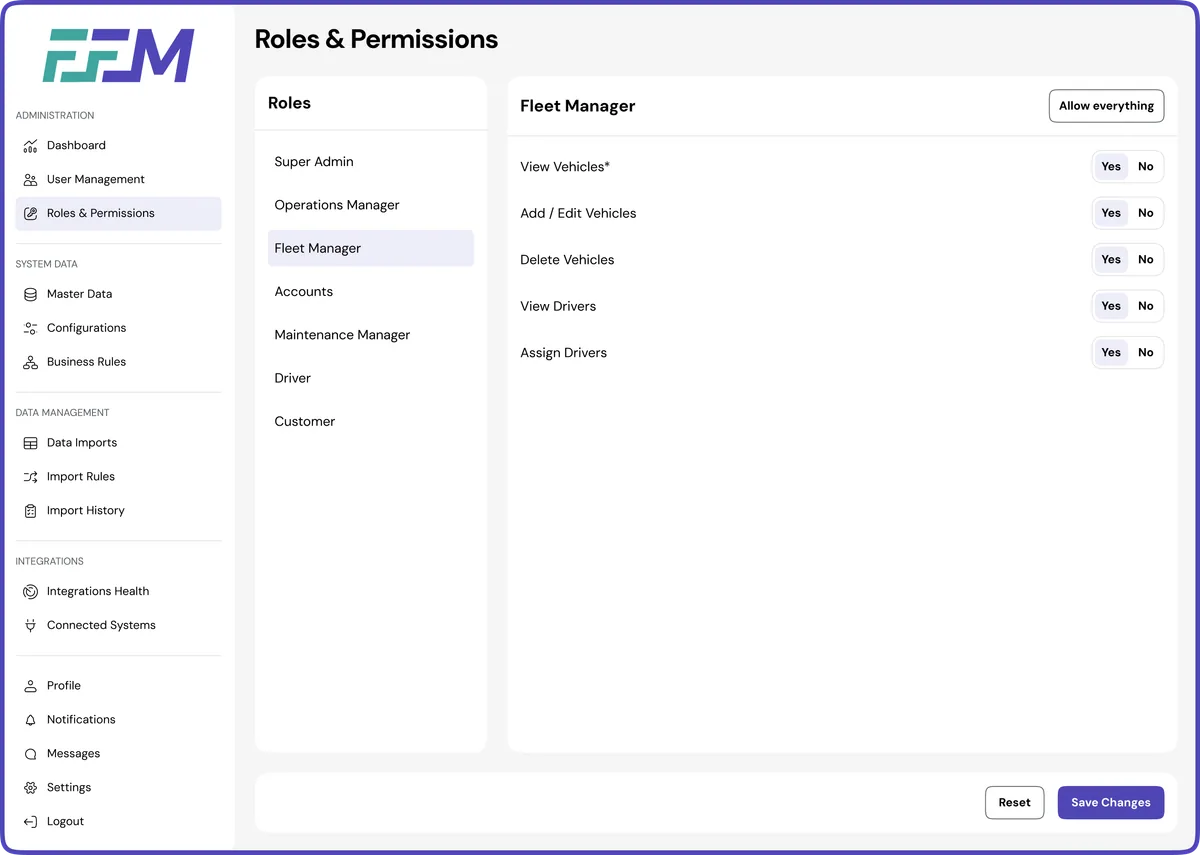
The Roles & Permissions module enables administrators to define and manage access control across the platform. Each role—such as Fleet Manager, Operations Manager, Accounts, or Driver—can be configured with specific permissions that determine what actions users are allowed to perform within the system.
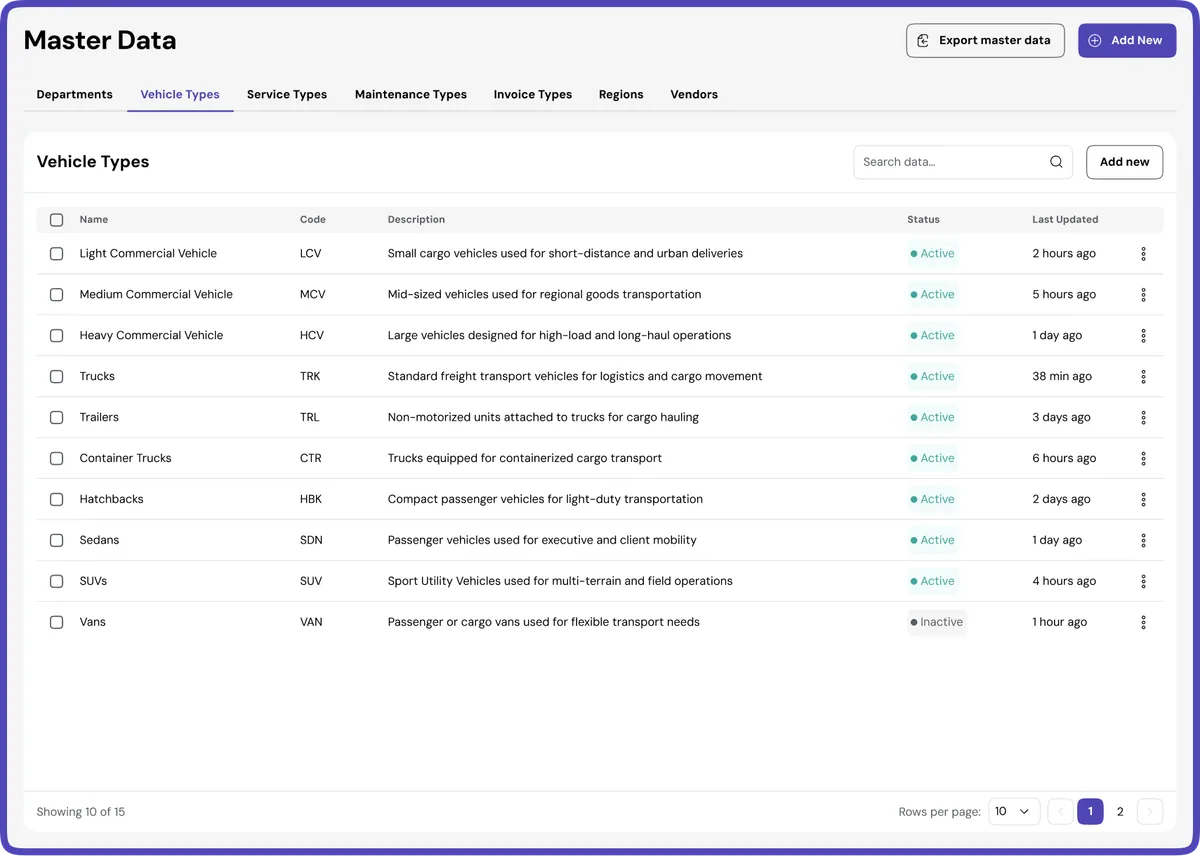
The Master Data module serves as the centralized repository for managing core system information used across the platform. Administrators can define and maintain essential data such as departments, vehicle types, service categories, regions, and vendors. By organizing and standardizing these records, the platform ensures consistency across operational workflows, reporting, and integrations, enabling different modules to function seamlessly with accurate and structured data.
The Data Import module allows administrators to efficiently upload and process large datasets into the system. It simplifies the migration of operational records such as vehicles, drivers, vendors, and financial data through a structured step-by-step import workflow. The process includes file upload, field mapping, validation, and final data confirmation to ensure accuracy and data integrity across the platform.
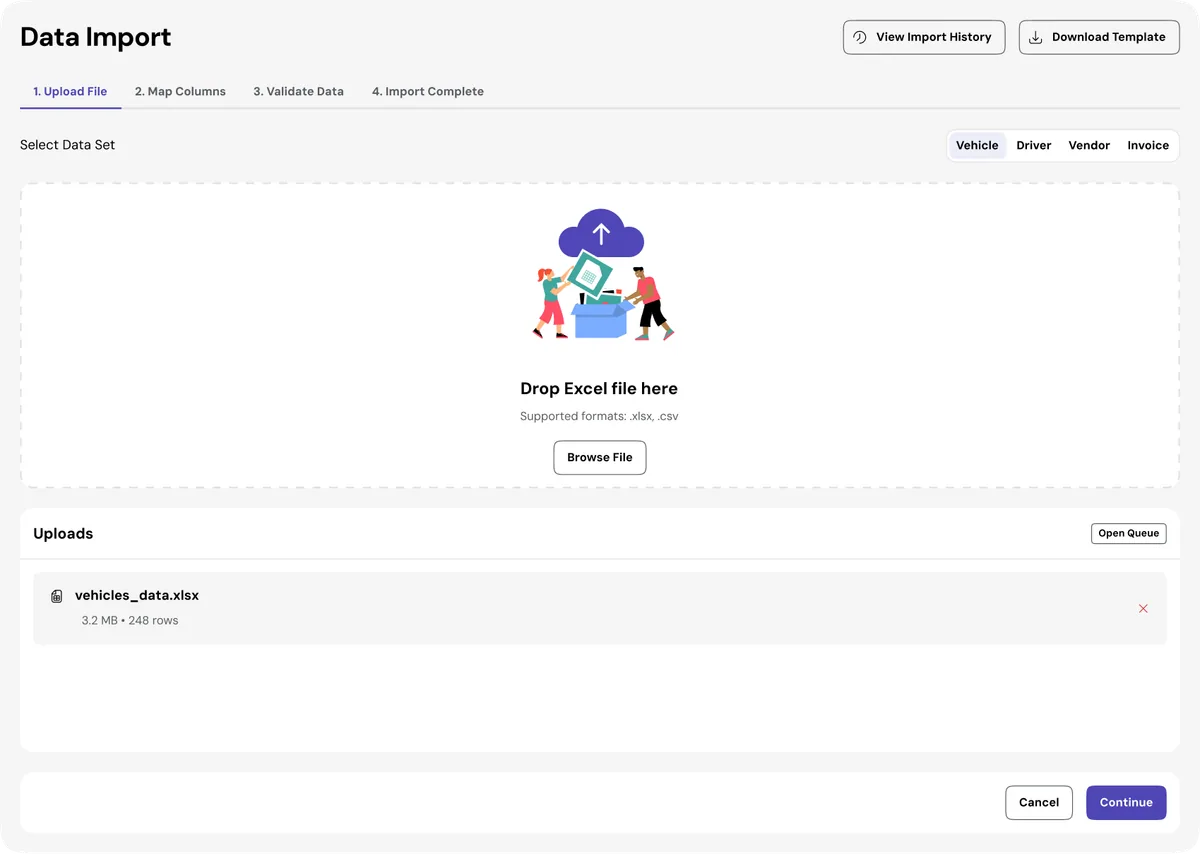
Step 1
Administrators begin by uploading an Excel file containing the dataset to be imported. The interface supports drag-and-drop uploads and allows users to download predefined templates to ensure the correct data structure before submission.
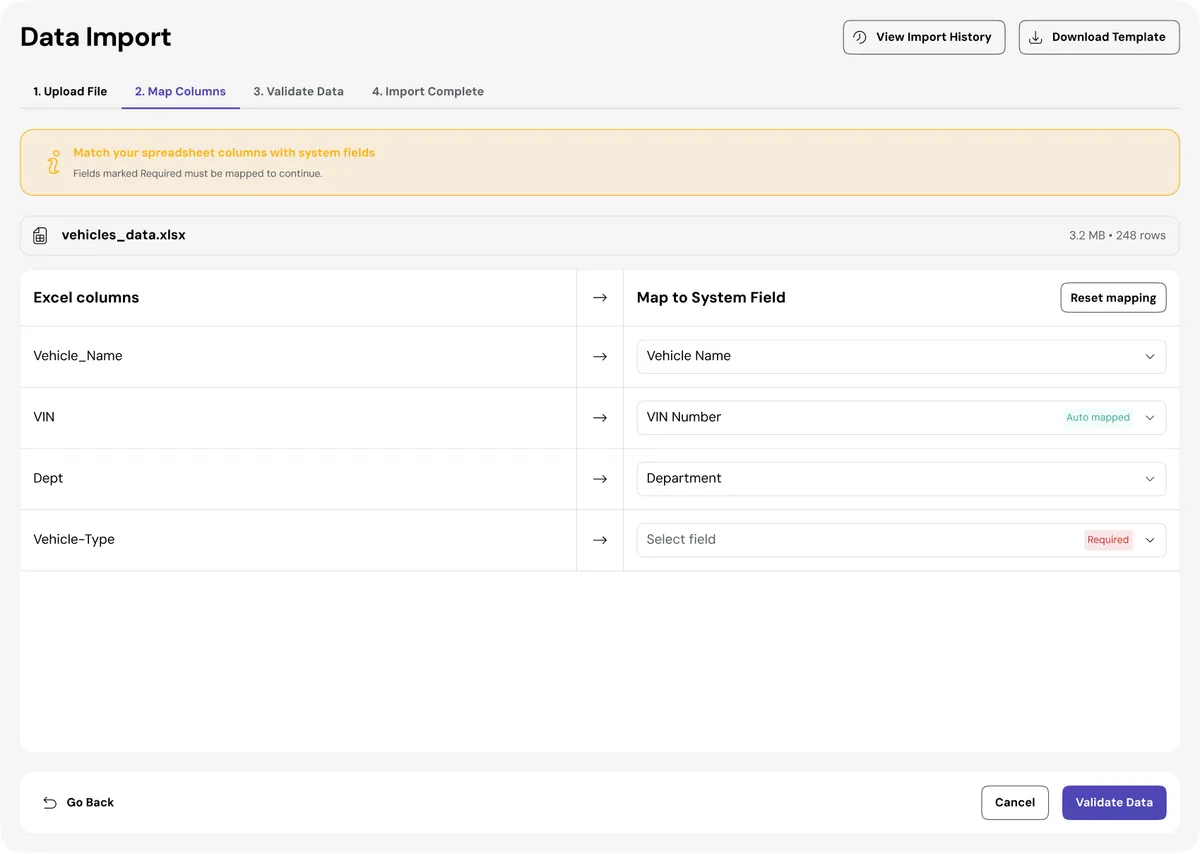
Step 2
After uploading the file, the system allows administrators to map Excel columns to the corresponding system fields. This step ensures that data such as vehicle numbers, departments, and service types are correctly aligned with the platform’s database structure.
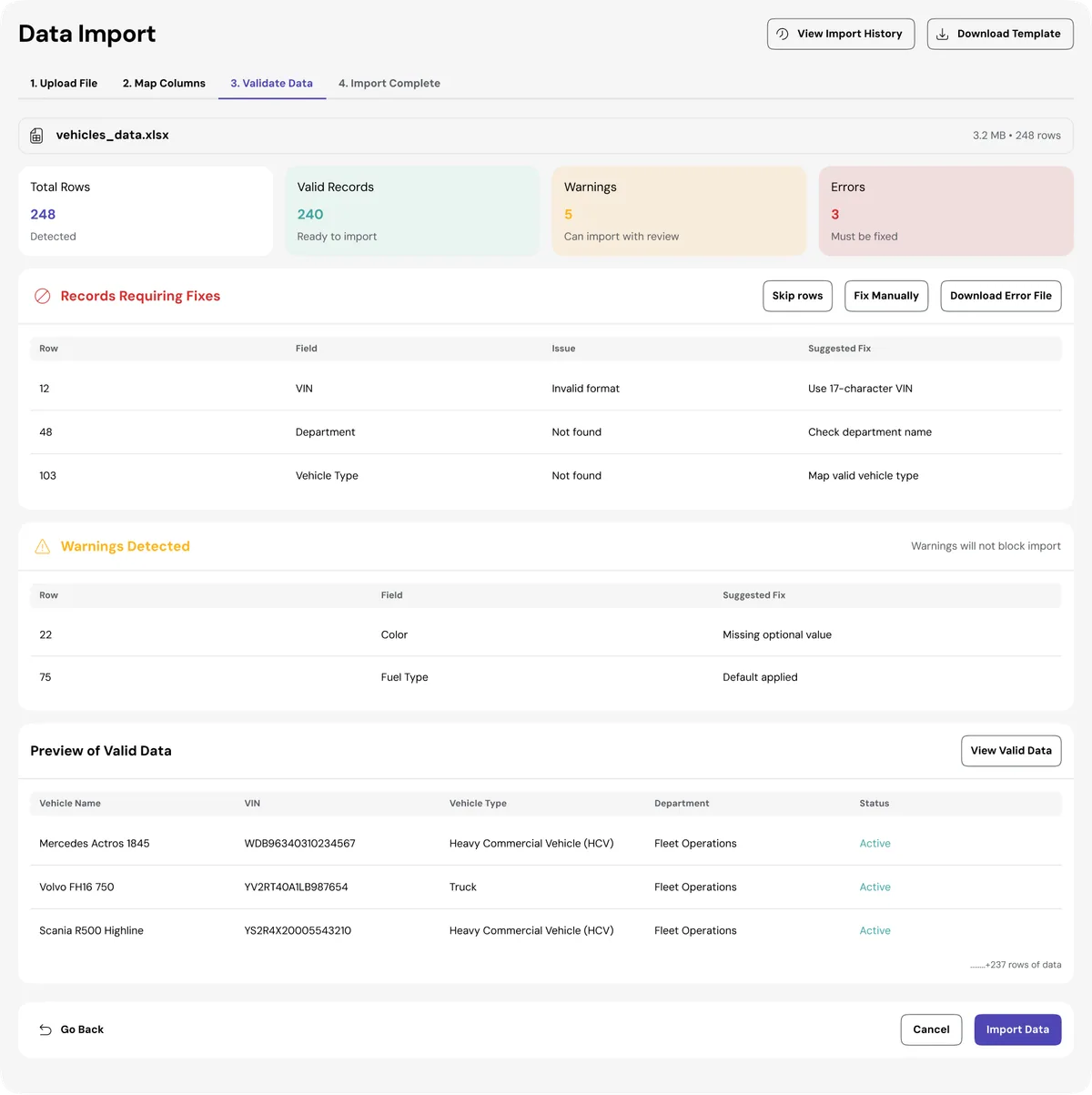
Step 3
Before completing the import, the system automatically validates all records and highlights errors or warnings. Administrators can review problematic entries, download error reports, and correct issues to prevent incorrect data from being imported.
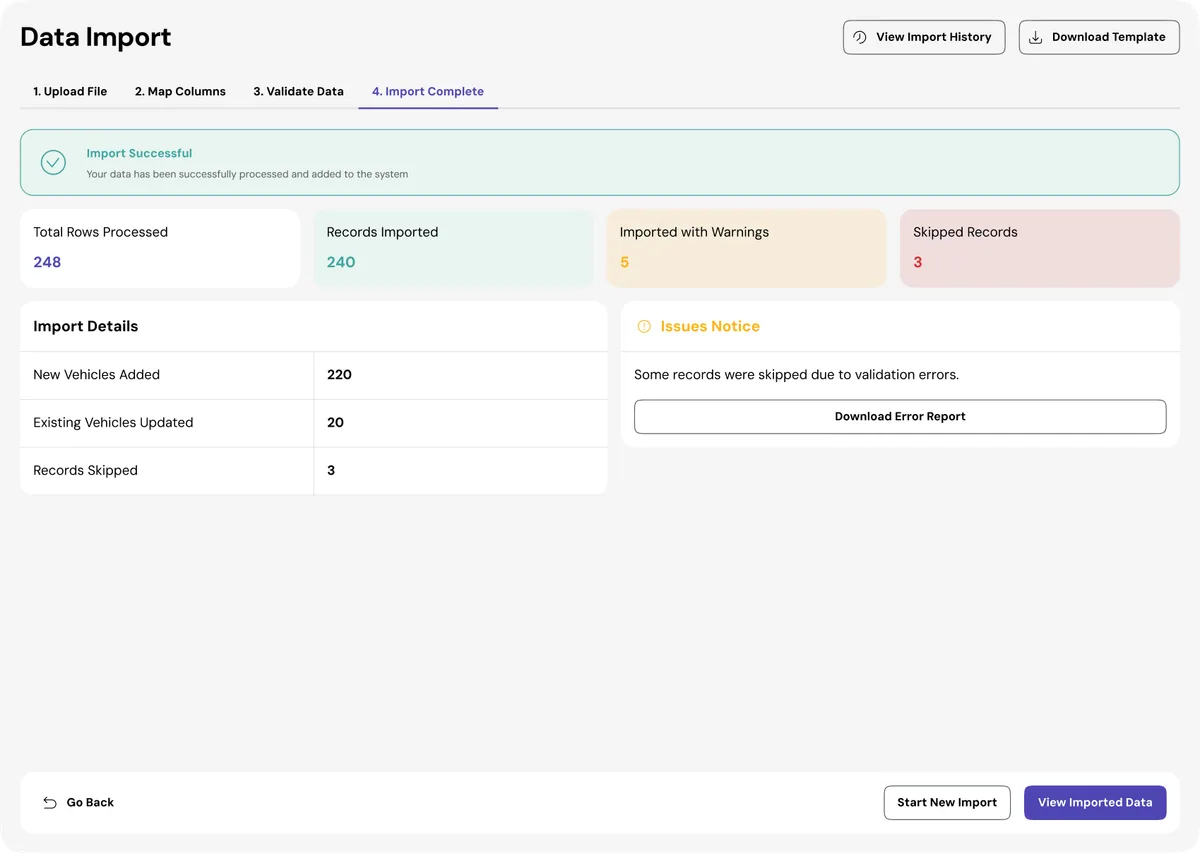
Step 4
Once validation is successful, the system processes the data and confirms the import results. The final screen provides a summary of processed records, successful imports, warnings, and skipped entries, giving administrators full visibility into the data import outcome.
PRODUCT INTERFACE
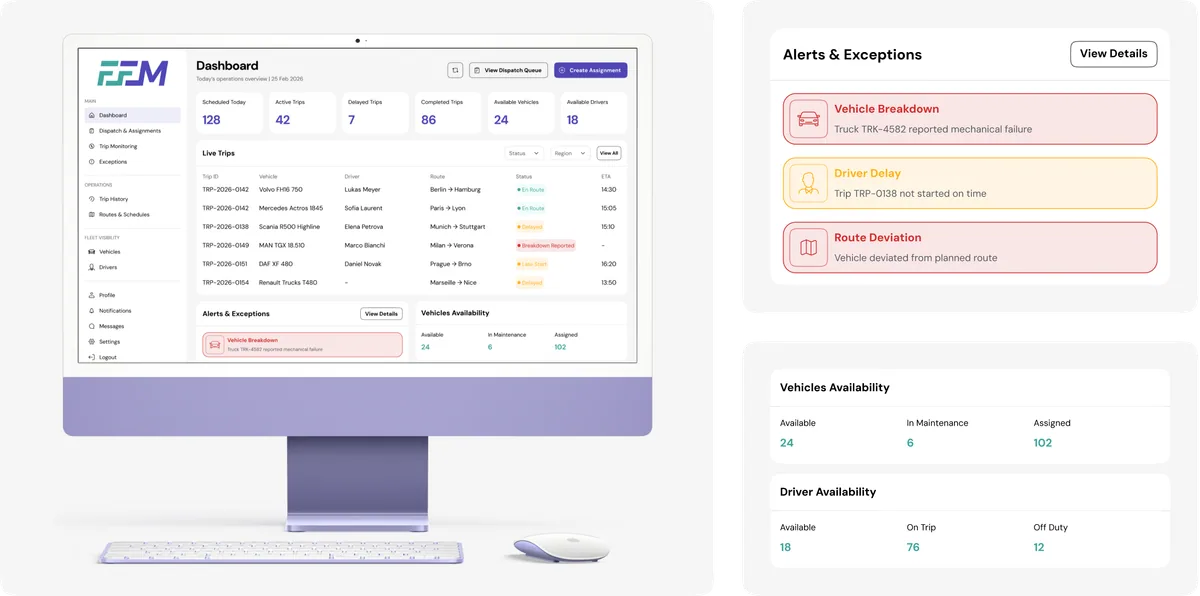
The Operations Manager Dashboard provides a real-time overview of fleet activities and dispatch operations. It highlights key metrics such as scheduled trips, active journeys, delays, and completed routes to help operations teams monitor daily performance. The dashboard also displays live trip details, alerts for operational issues like vehicle breakdowns or route deviations, and the availability of vehicles and drivers, enabling quick decision-making and efficient dispatch management.
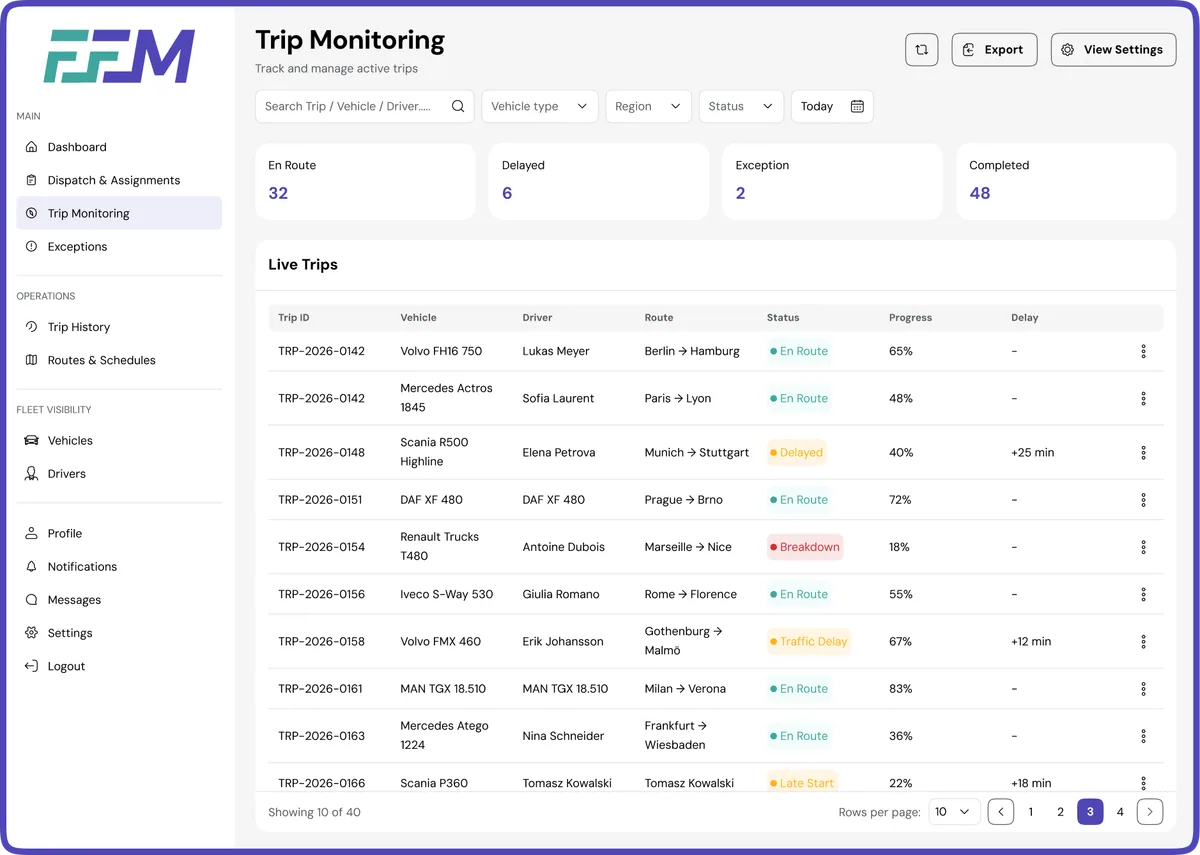
The Trip Monitoring module provides operations teams with real-time visibility into active fleet movements. It allows managers to track trip progress, monitor vehicle and driver status, and quickly identify delays or operational exceptions. The dashboard highlights key trip metrics such as active journeys, delayed trips, and completed routes, while the live trip table offers detailed insights including route information, trip progress, and potential delays.
The Exceptions module helps operations teams identify and manage unexpected issues that occur during active trips. It provides a centralized view of operational disruptions such as vehicle breakdowns, route deviations, traffic delays, and late starts. The interface categorizes exceptions by severity and status, allowing managers to quickly prioritize critical issues and take appropriate action to minimize operational impact.
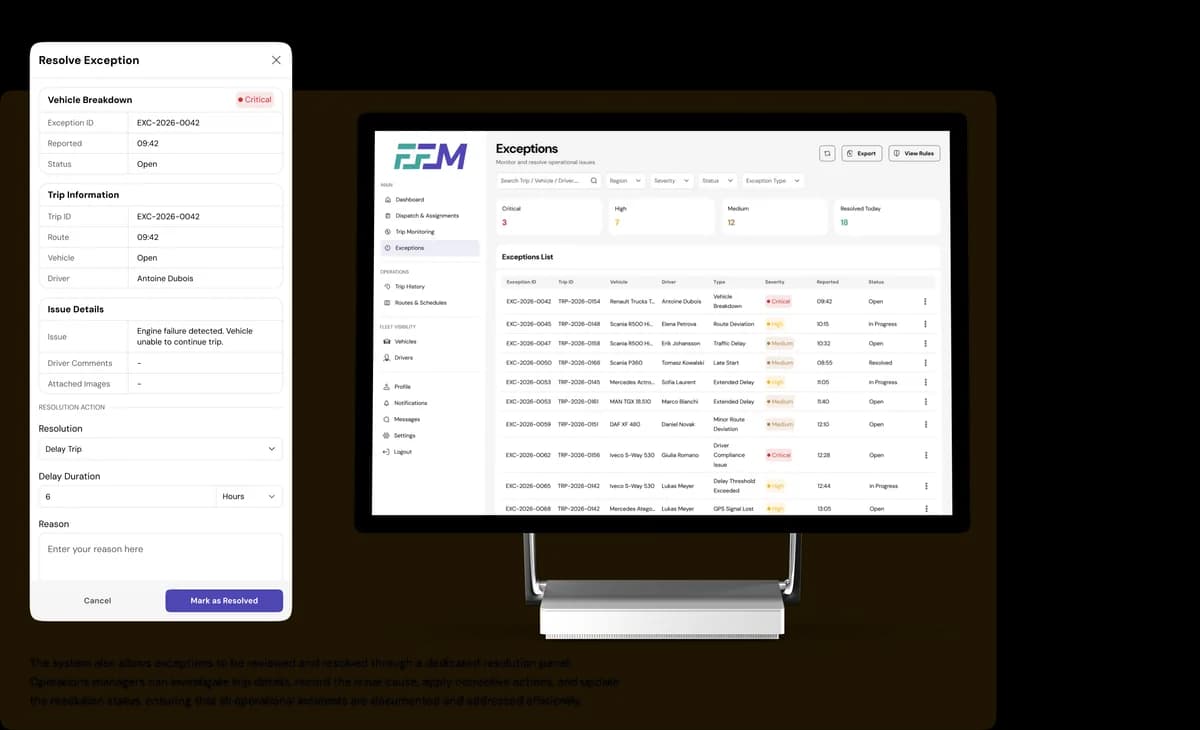
The system also allows exceptions to be reviewed and resolved through a dedicated resolution panel. Operations managers can investigate trip details, record the issue cause, apply corrective actions, and update the resolution status, ensuring that all operational incidents are documented and addressed efficiently.
PRODUCT INTERFACE
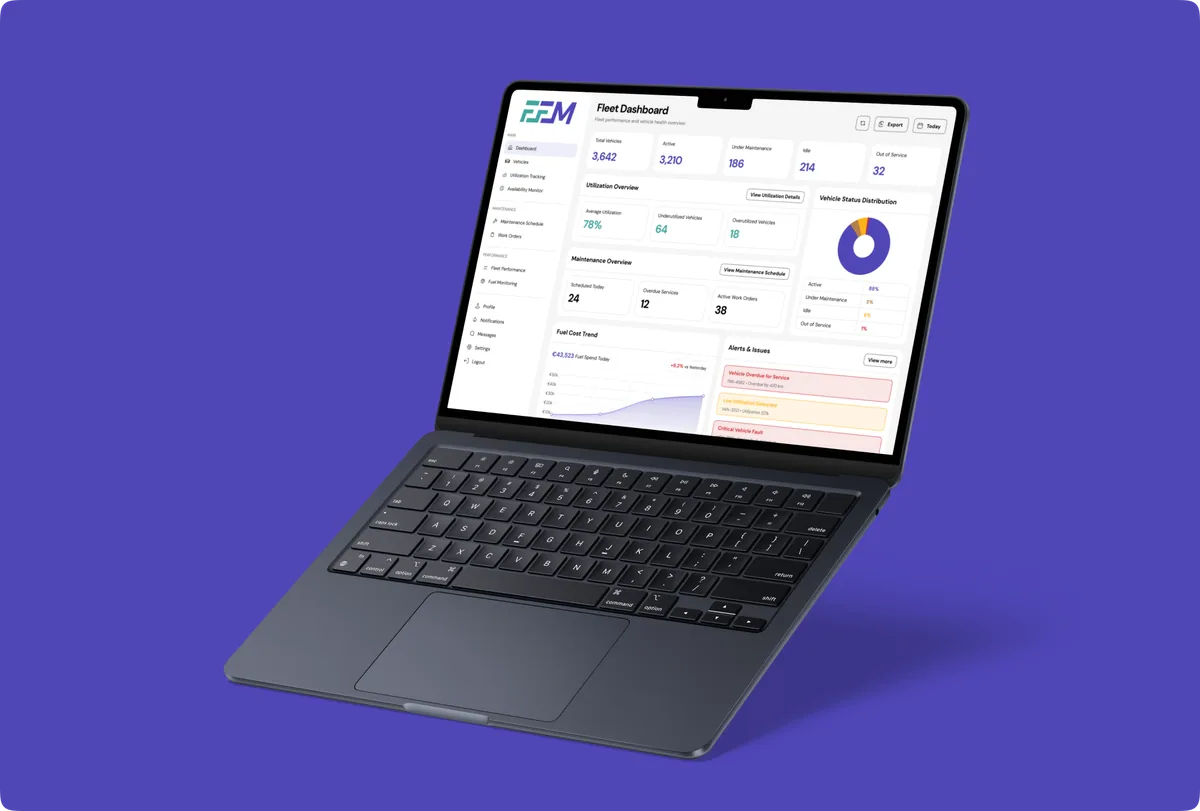
The Fleet Manager Dashboard provides an overview of fleet performance, vehicle status, and operational utilization. It highlights key metrics such as active vehicles, maintenance status, and idle units, helping managers quickly understand fleet health. The dashboard also displays utilization insights, maintenance activities, fuel trends, and alerts to support efficient fleet monitoring and timely decision-making.
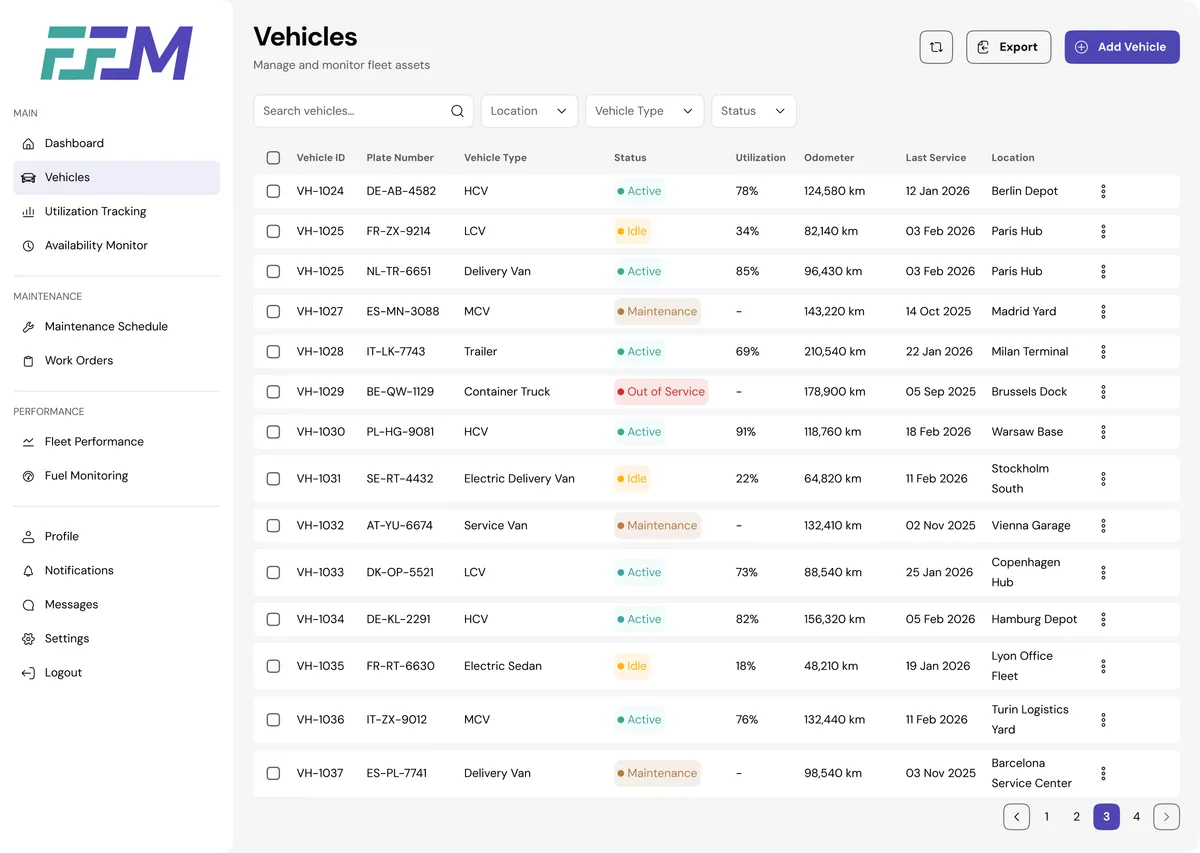
The Vehicles module provides a centralized view of all fleet assets, allowing fleet managers to monitor vehicle status, utilization, location, and service history. Through a structured table interface, managers can quickly identify active, idle, or out-of-service vehicles while tracking key details such as mileage and last service date. This module enables efficient fleet oversight and supports better planning for maintenance and vehicle allocation.
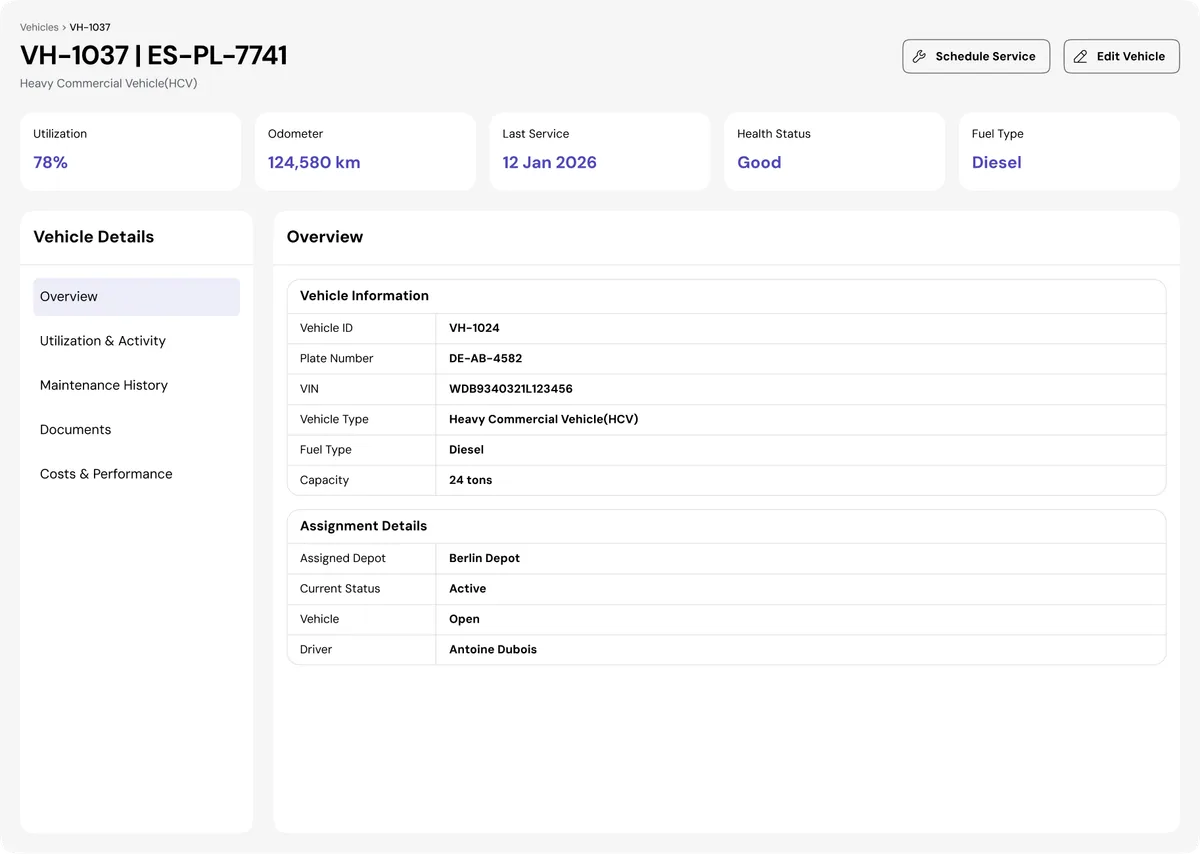
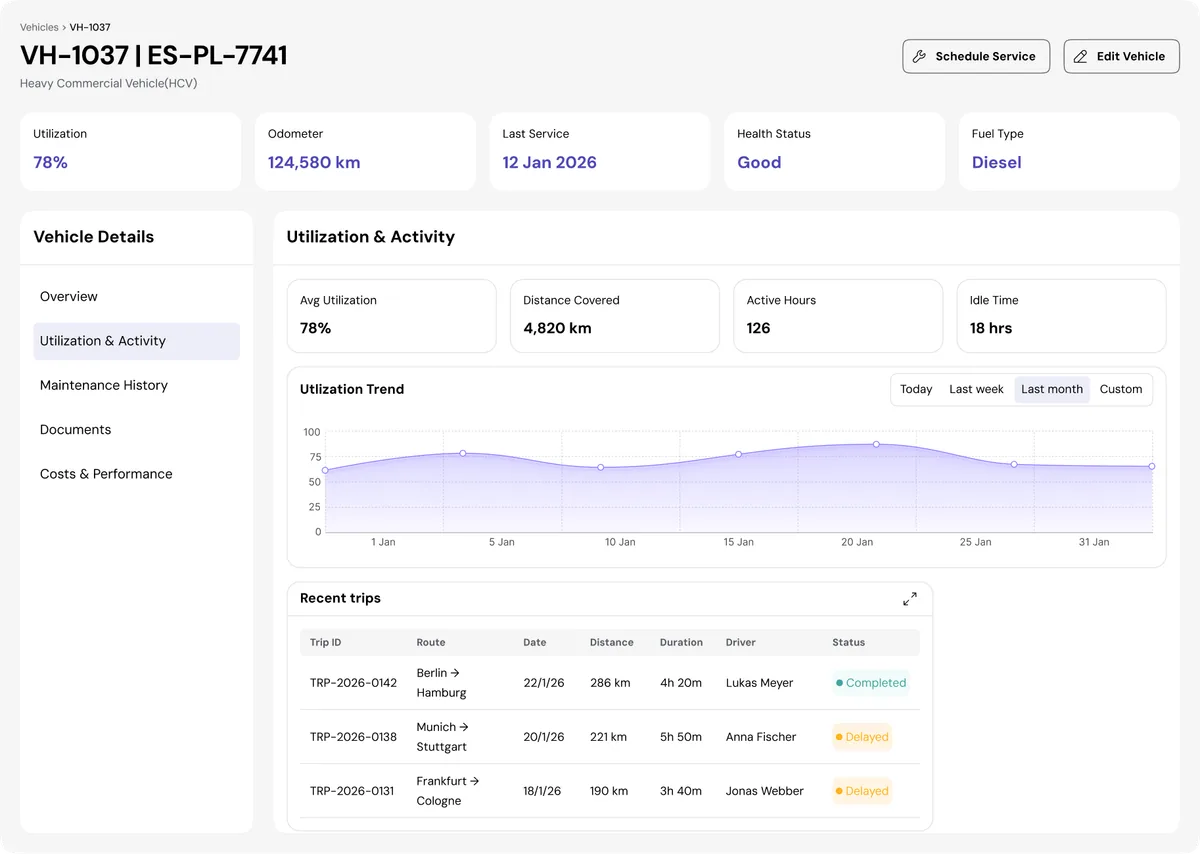
The Vehicle Profile provides a detailed view of an individual vehicle within the fleet. It displays key information such as vehicle specifications, assignment details, service history, and operational status. Fleet managers can monitor vehicle utilization, track recent trips, and review performance metrics to ensure optimal vehicle usage. This centralized profile helps maintain accurate records while supporting better maintenance planning and operational decision-making.
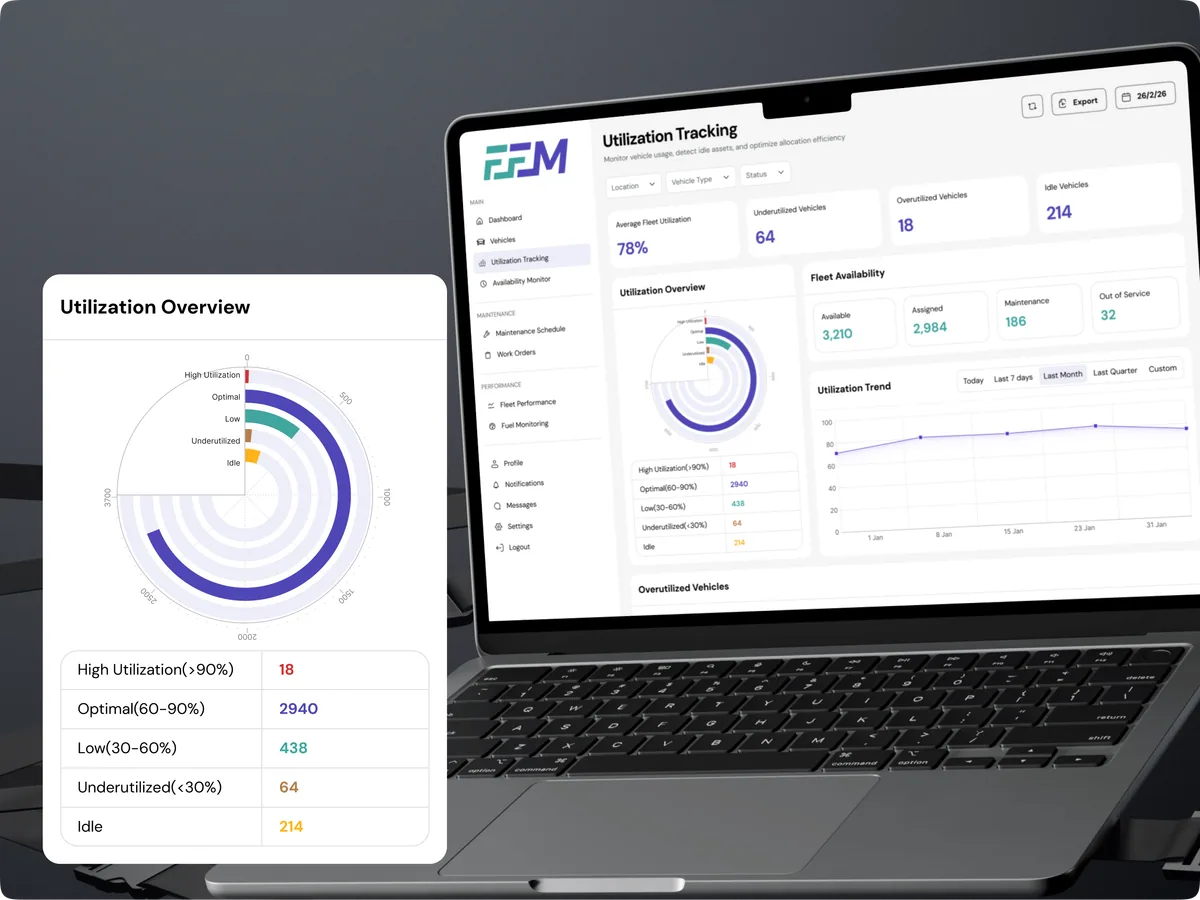
The Utilization Tracking module provides insights into how effectively fleet assets are being used across operations. Fleet managers can monitor average utilization, identify underutilized or idle vehicles, and detect assets that are overused and may require maintenance attention. Interactive charts and trend analytics help teams optimize vehicle allocation, improve operational efficiency, and balance fleet workload across regions and vehicle types.
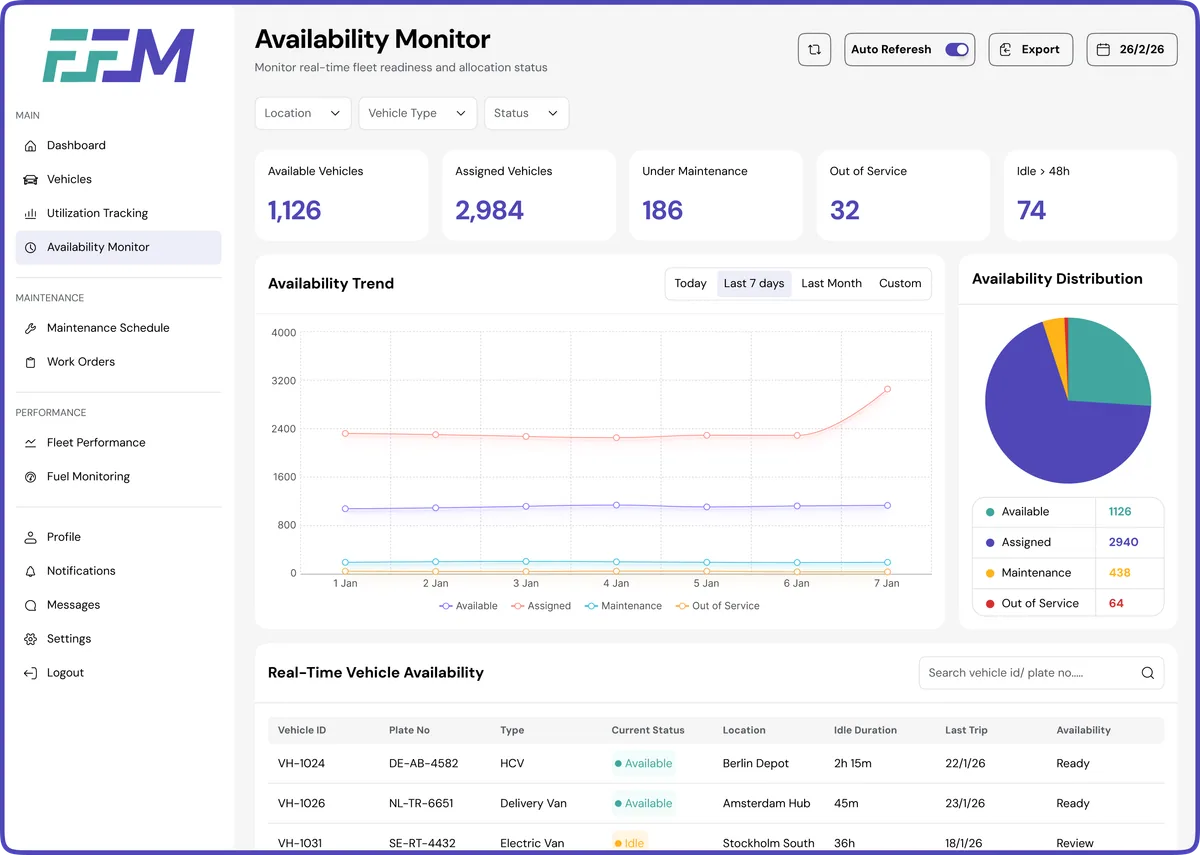
The Availability Monitor provides real-time visibility into the operational status of the entire fleet. Managers can quickly see how many vehicles are available, assigned, under maintenance, or out of service across different regions. Trend charts and distribution insights help identify availability gaps, ensuring that the right vehicles are ready when needed. This module supports faster operational decisions and improves overall fleet readiness.
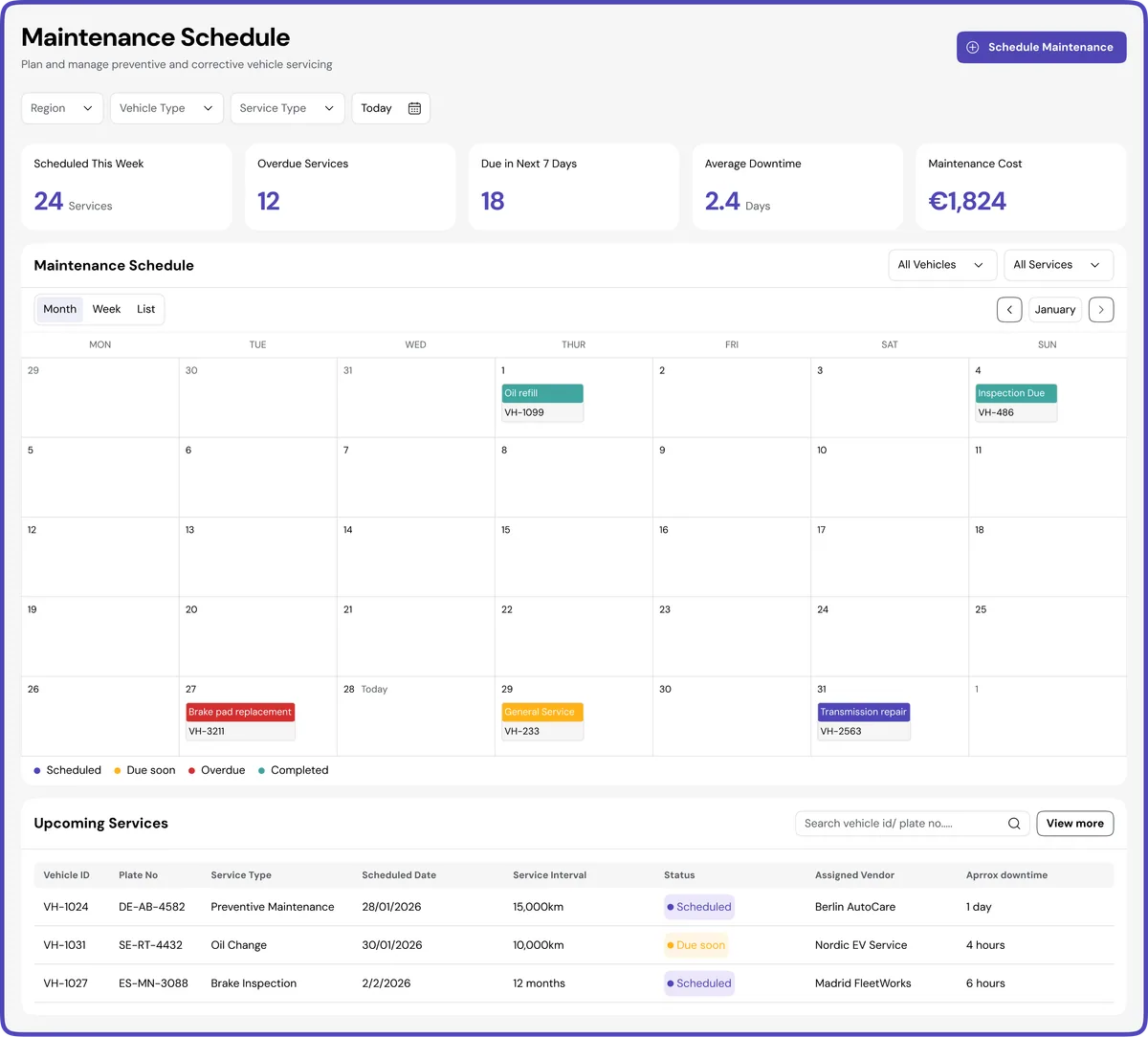
The Maintenance Schedule module helps fleet managers plan and track preventive and routine servicing across the entire fleet. With a calendar-based view, teams can easily visualize upcoming maintenance, overdue services, and scheduled inspections. This ensures vehicles are serviced on time, reducing unexpected breakdowns and improving fleet reliability and operational continuity.
PRODUCT INTERFACE
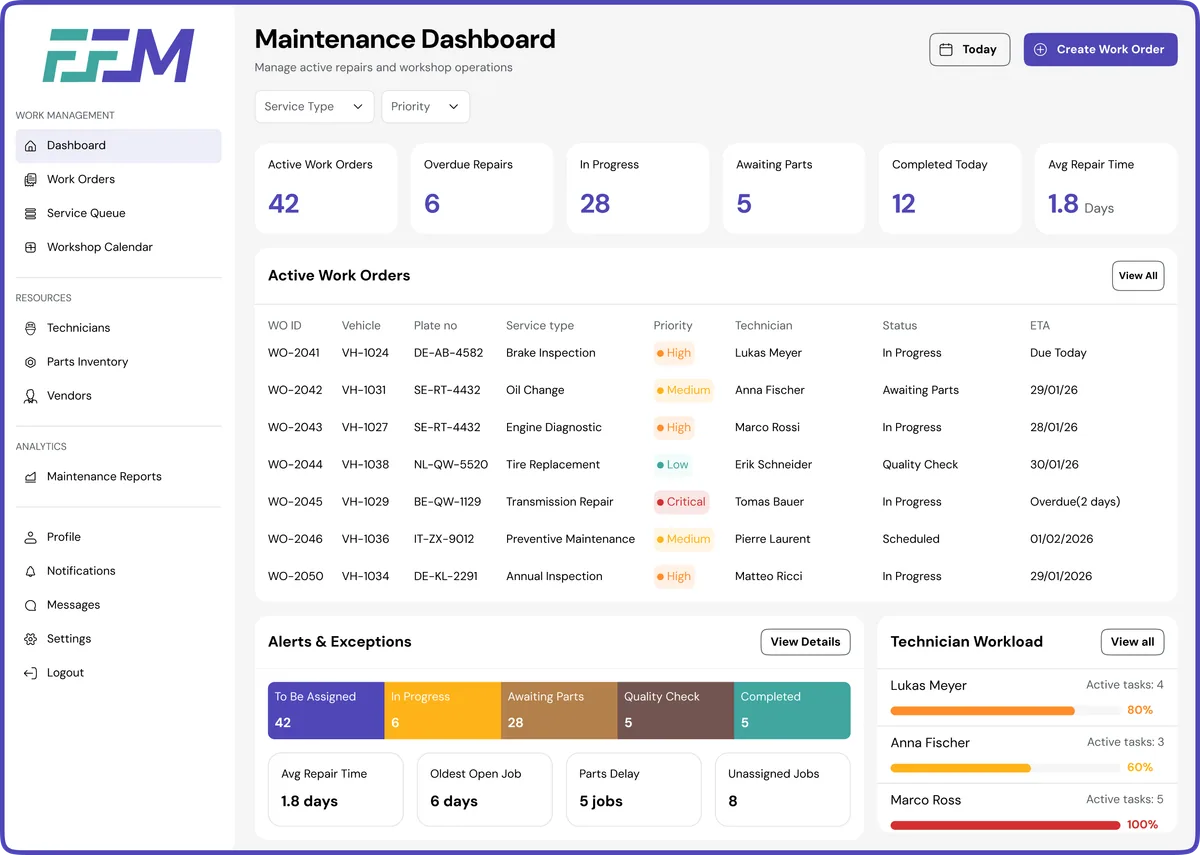
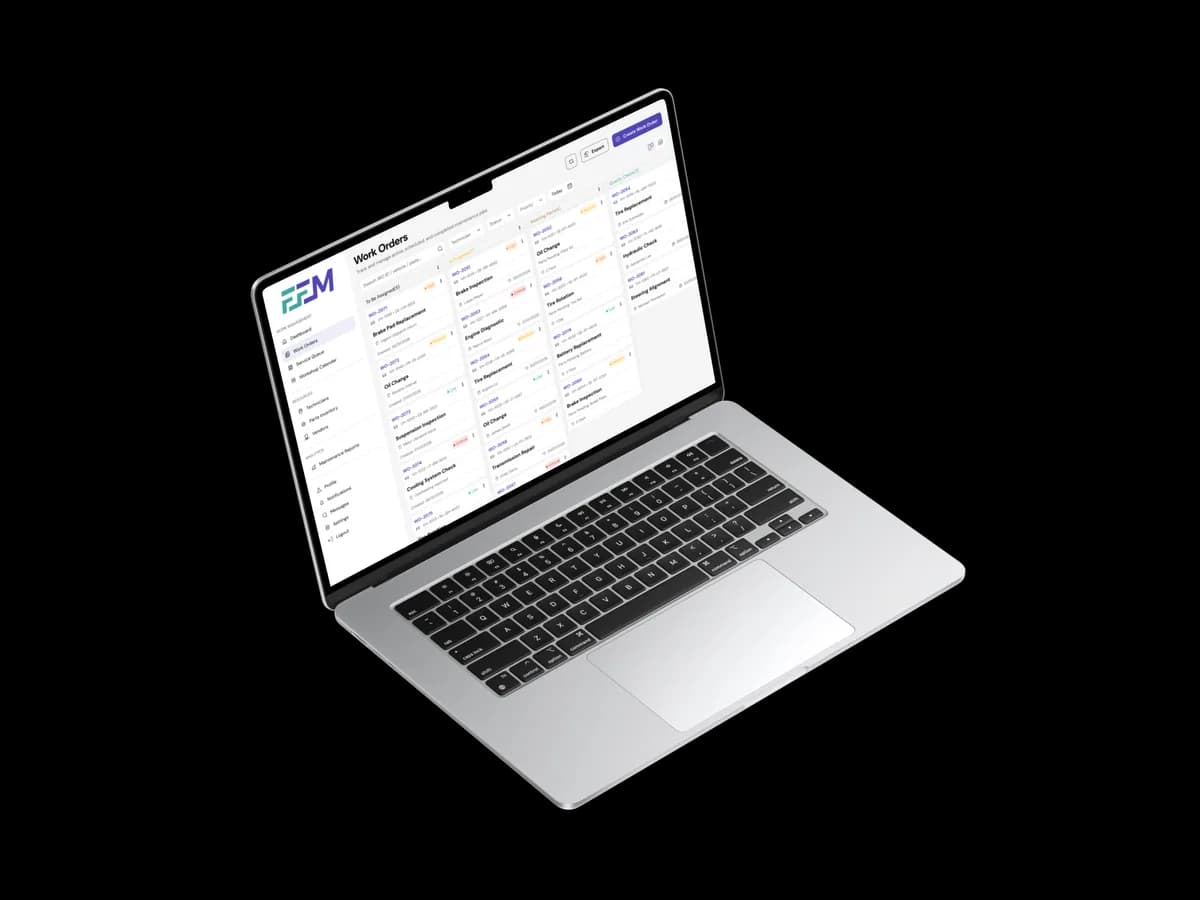
The Work Orders module provides a structured view of all maintenance tasks across the fleet, enabling teams to manage repairs, inspections, and servicing activities efficiently. Using a Kanban-style workflow, maintenance managers can track work orders from assignment to completion, quickly identifying tasks in progress, pending parts, or awaiting quality checks. This visual workflow improves coordination between technicians, reduces maintenance delays, and ensures that vehicle servicing is handled in a timely and organized manner.
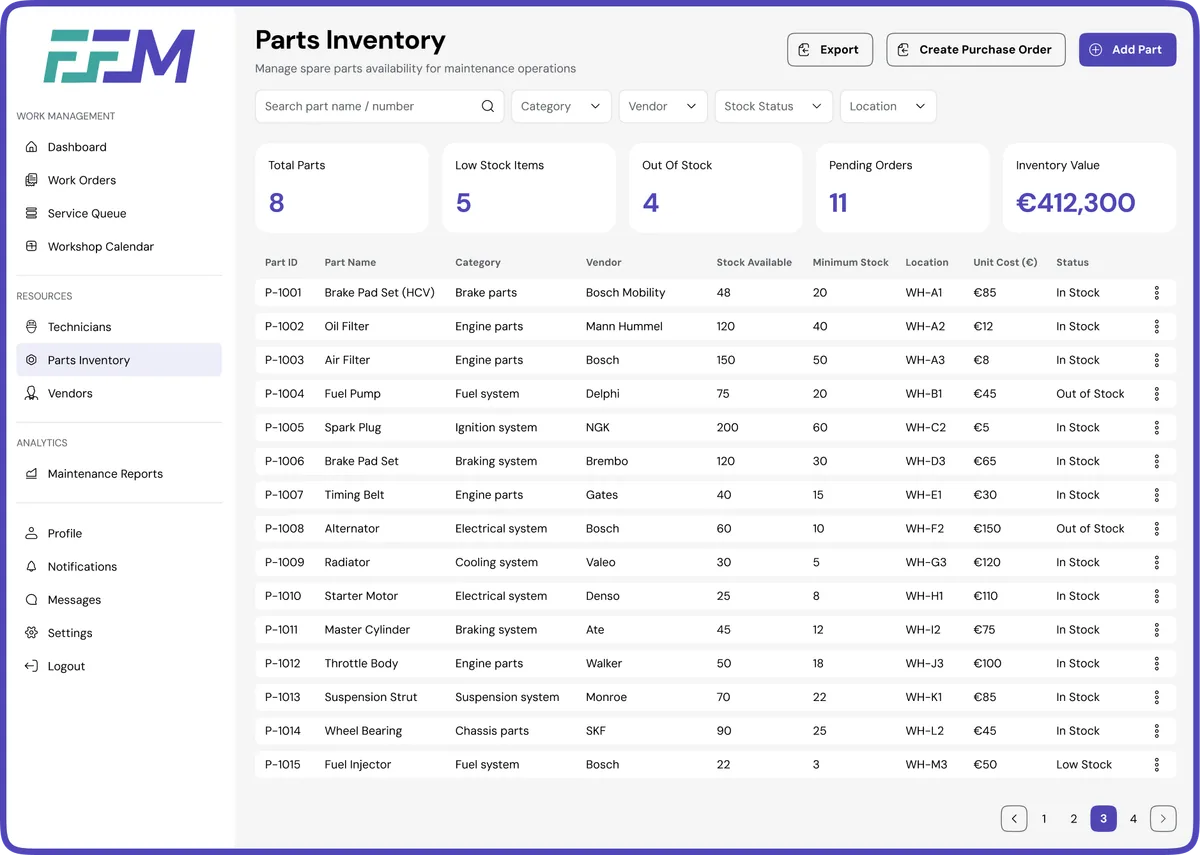
The Parts Inventory module enables maintenance teams to track and manage spare parts required for vehicle servicing. It provides visibility into stock levels, low-inventory alerts, pending purchase orders, and overall inventory value. By maintaining a structured record of parts, vendors, and storage locations, the system ensures that required components are available when maintenance tasks are scheduled, reducing service delays and improving workshop efficiency.
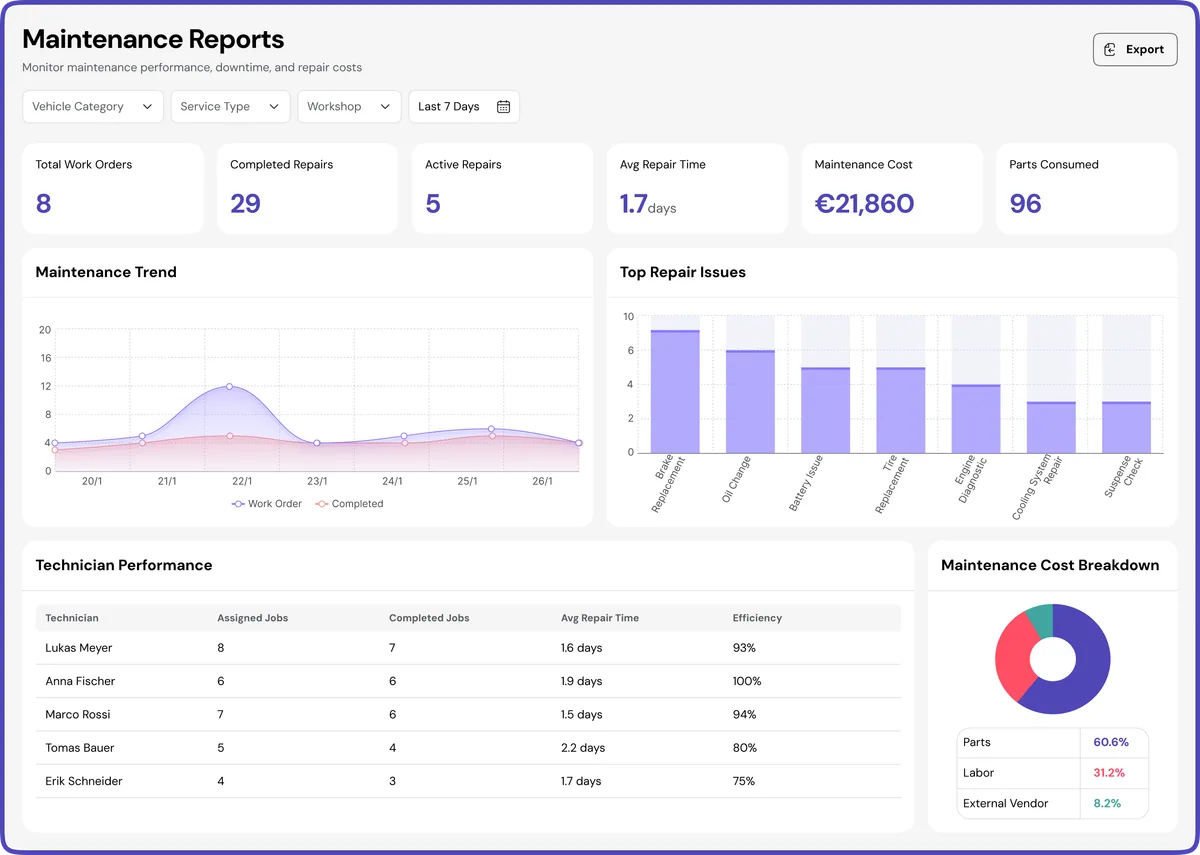
The Maintenance Reports module provides analytical insights into fleet servicing activities and operational efficiency. It highlights key metrics such as completed repairs, active work orders, repair time, and overall maintenance costs. Visual charts and technician performance data help managers identify recurring issues, monitor workshop productivity, and make informed decisions to optimize maintenance operations and reduce downtime.
PRODUCT INTERFACE
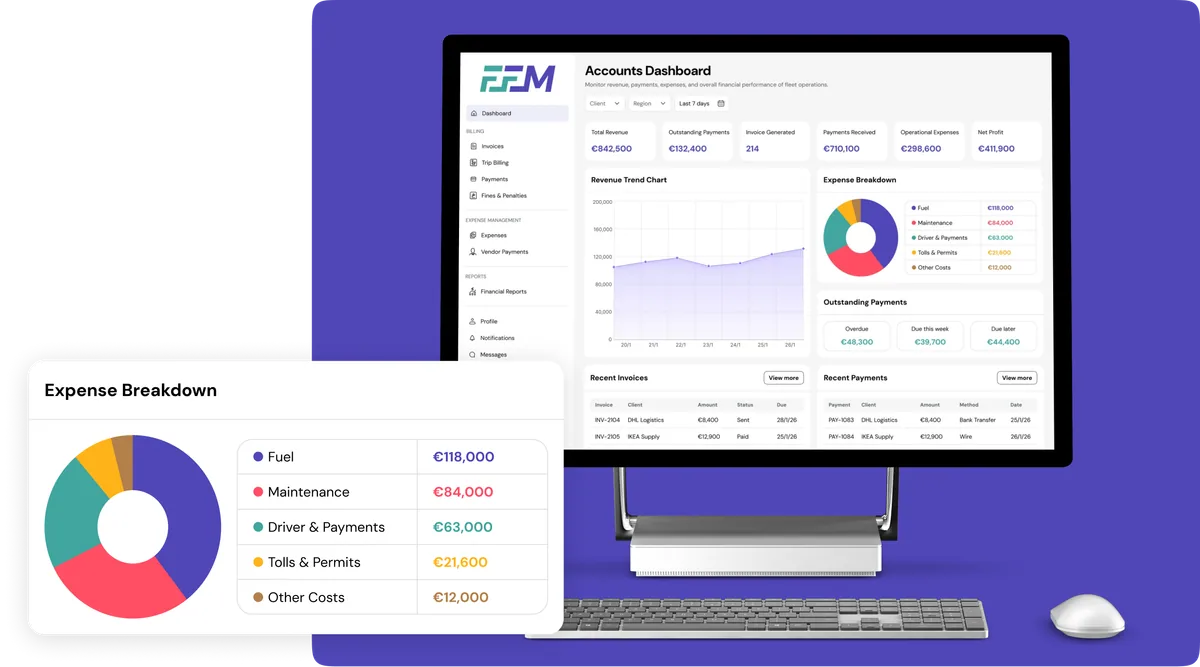
The Accounts Dashboard provides a financial overview of fleet operations, helping finance teams monitor revenue, invoices, payments, and operational expenses. Key metrics such as total revenue, outstanding payments, and net profit offer quick insight into financial performance. Visual charts and recent transaction summaries enable better tracking of cash flow, allowing teams to manage billing cycles, identify overdue payments, and maintain financial transparency across the system.
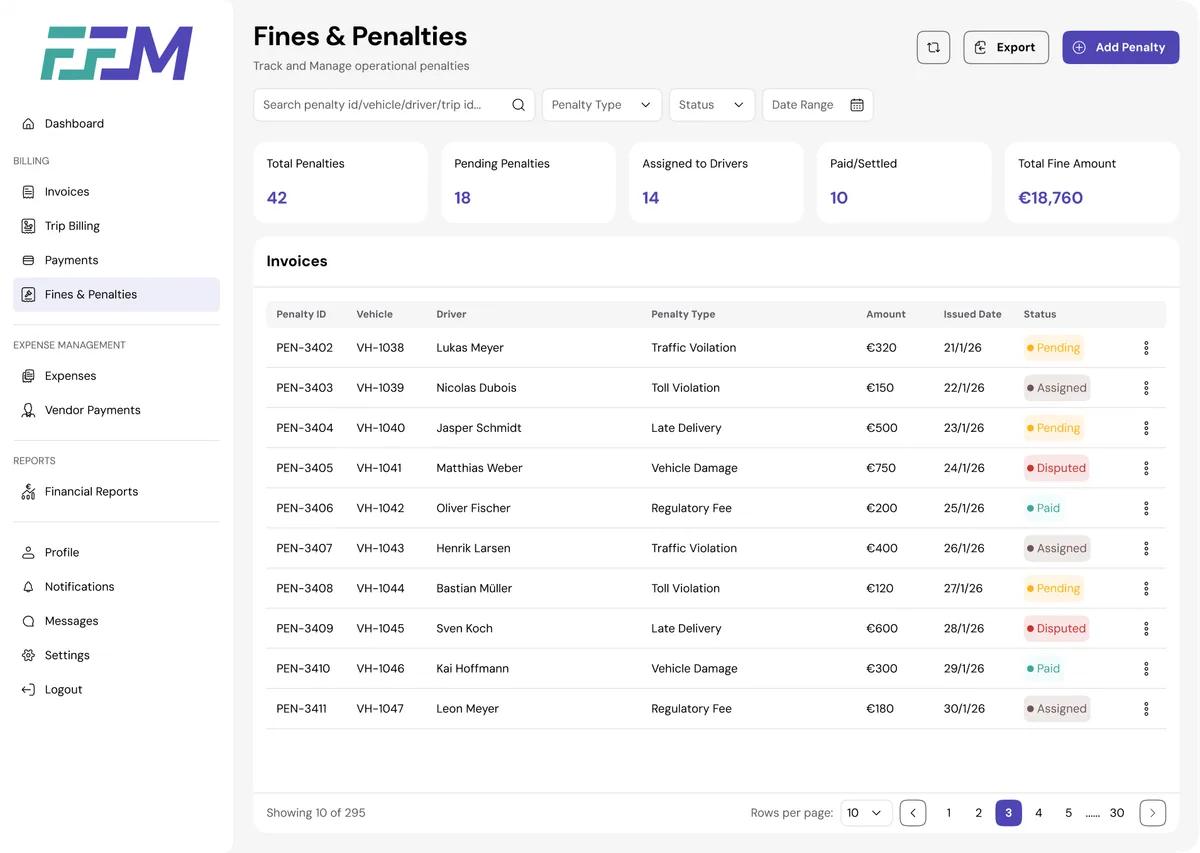
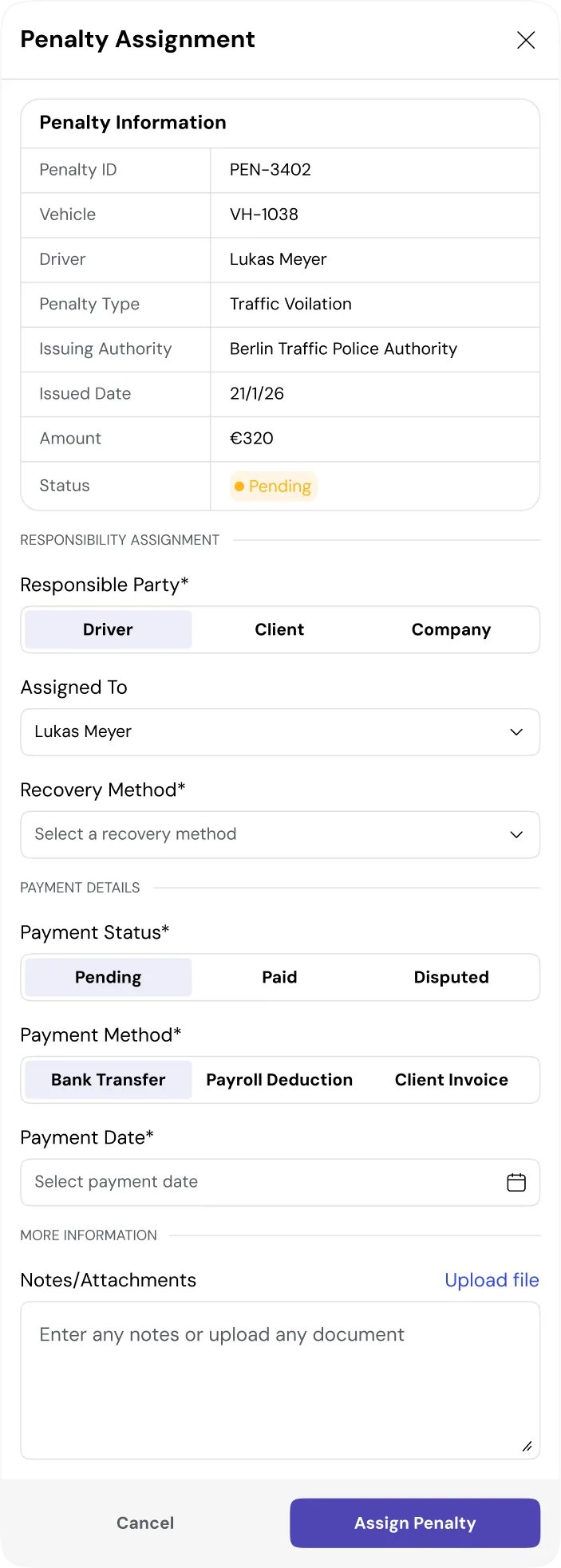
The Fines & Penalties module enables finance teams to track, assign, and manage operational violations related to fleet activities. It centralizes records for traffic violations, regulatory fines, and service-related penalties, allowing administrators to assign responsibility to drivers, clients, or the company. The system also tracks payment status, recovery methods, and pending penalties, ensuring transparent financial accountability and streamlined dispute handling.
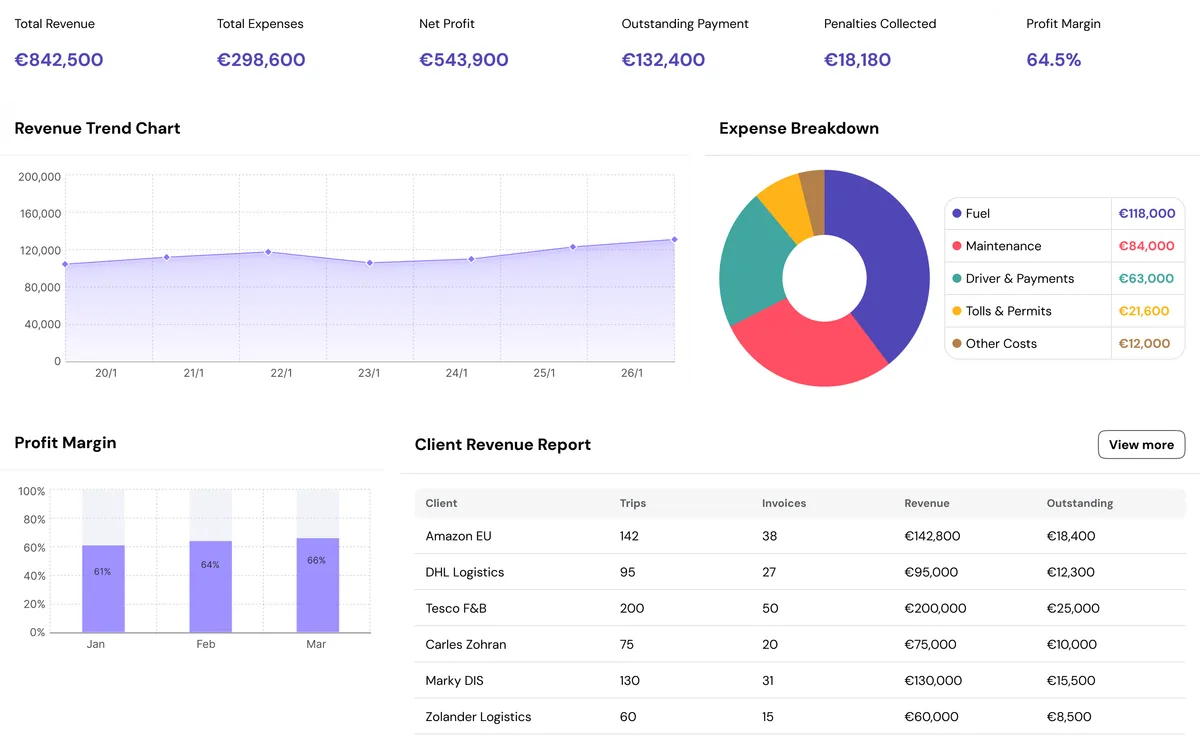
The Financial Reports screen provides a consolidated view of the fleet’s financial performance, enabling finance teams and management to analyze revenue, expenses, and profitability across operations. Key performance indicators such as total revenue, expenses, net profit, outstanding payments, penalties collected, and profit margin offer a quick snapshot of the company’s financial health. Interactive filters for region, client, and service type allow users to refine the data and evaluate performance across different segments of the business.
PRODUCT INTERFACE
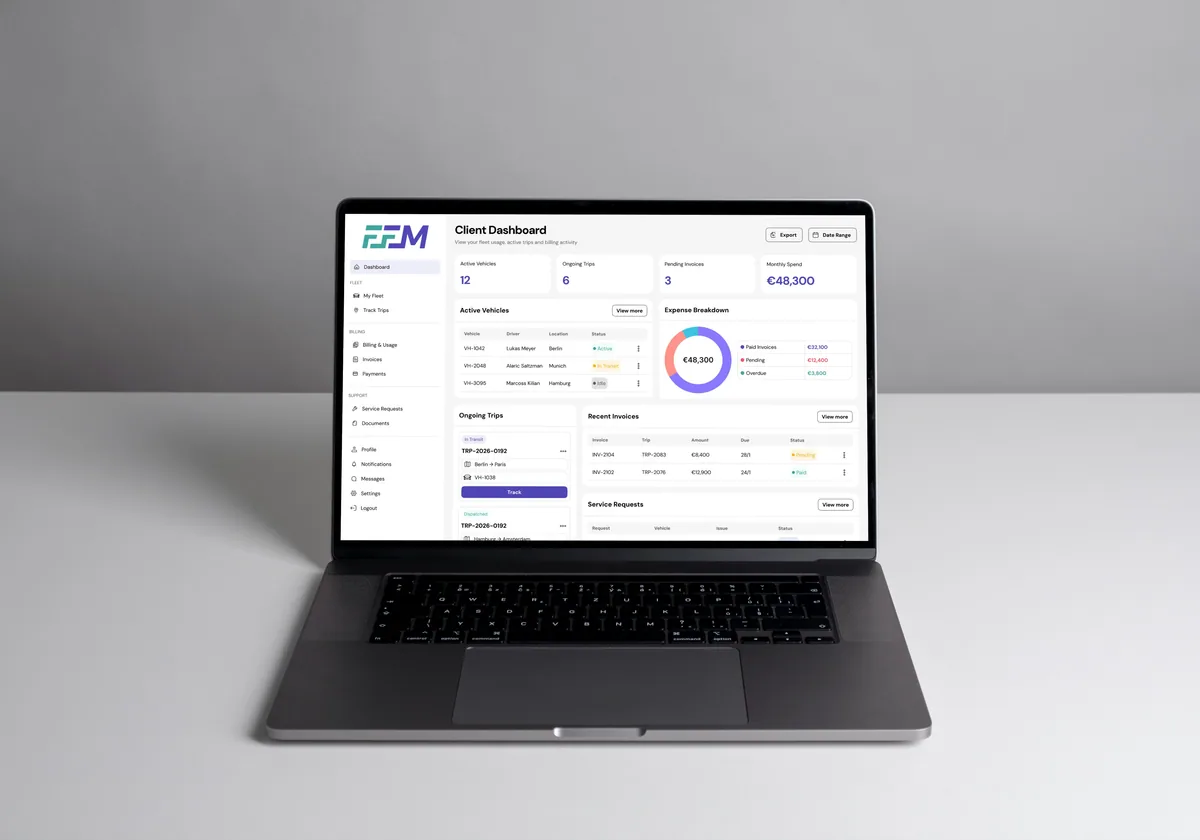
The Client Dashboard provides customers with a clear overview of their fleet activity, trips, and billing information. Clients can quickly see active vehicles, ongoing trips, pending invoices, and total monthly spend in one place. The dashboard also allows users to track live trips, monitor vehicle status, review recent invoices, and raise service requests when issues occur. This centralized view helps clients stay informed about their fleet operations while maintaining transparency in usage and billing.
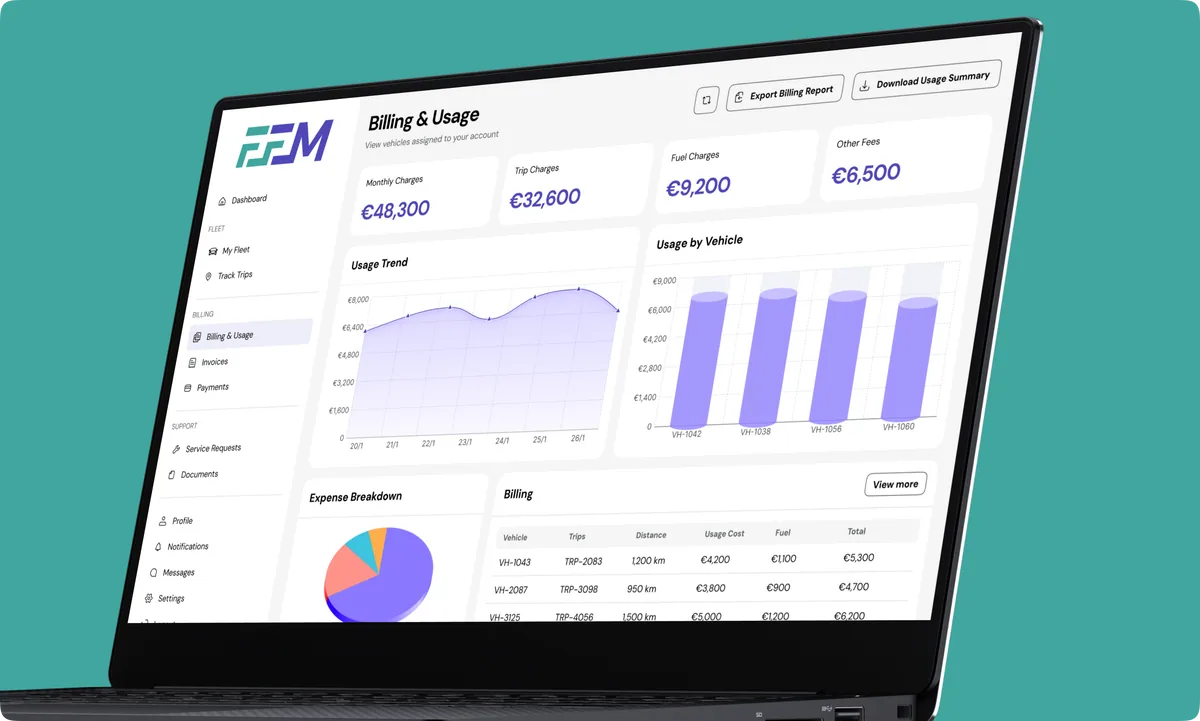
The Billing & Usage module allows clients to monitor their fleet-related expenses and usage in detail. It provides a breakdown of monthly charges, trip costs, fuel expenses, and additional service fees. Visual charts help clients understand usage trends and cost distribution, while the billing table offers transparency into trip-level charges and distances. This section enables clients to track operational spending, download reports, and better manage fleet-related budgets.
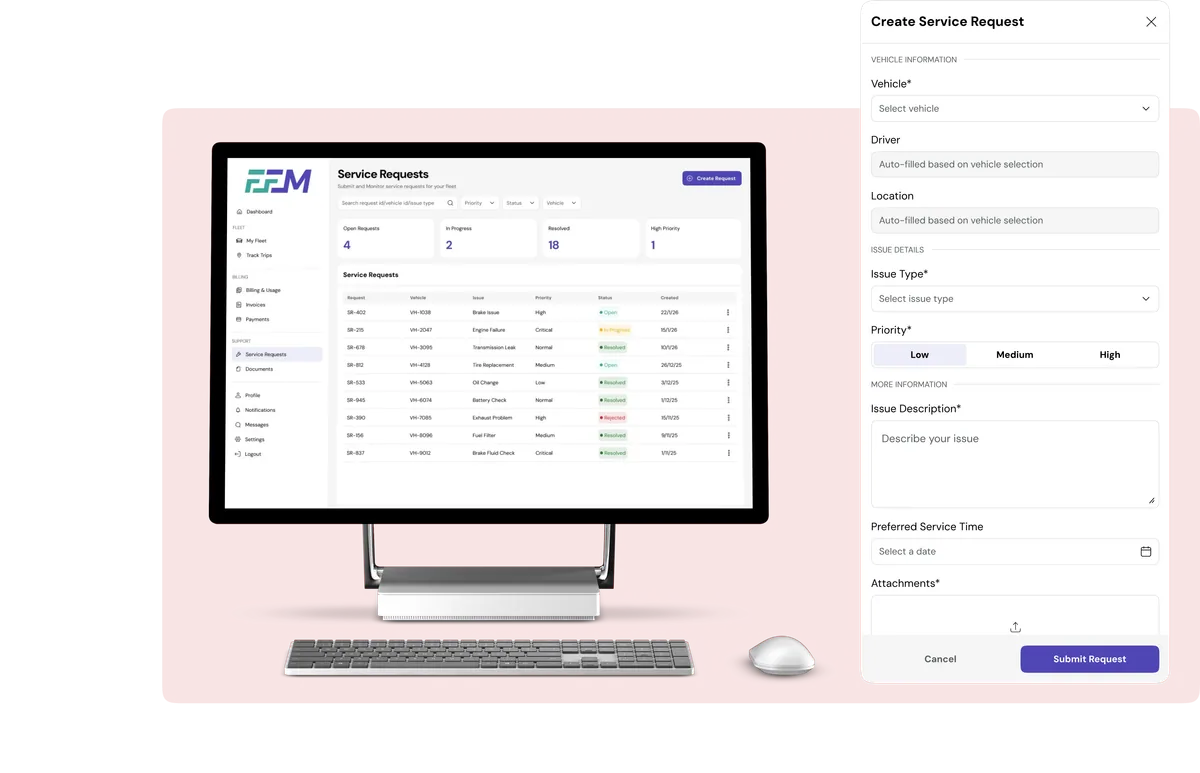
The Service Requests module allows clients to report issues and request maintenance for their assigned vehicles. Through a simple request form, users can select the vehicle, describe the issue, set priority levels, and attach supporting documents if needed. The system then tracks each request through its lifecycle—from open to in progress and resolved—providing clients with clear visibility into service status and ensuring timely maintenance support for their fleet.
PRODUCT INTERFACE
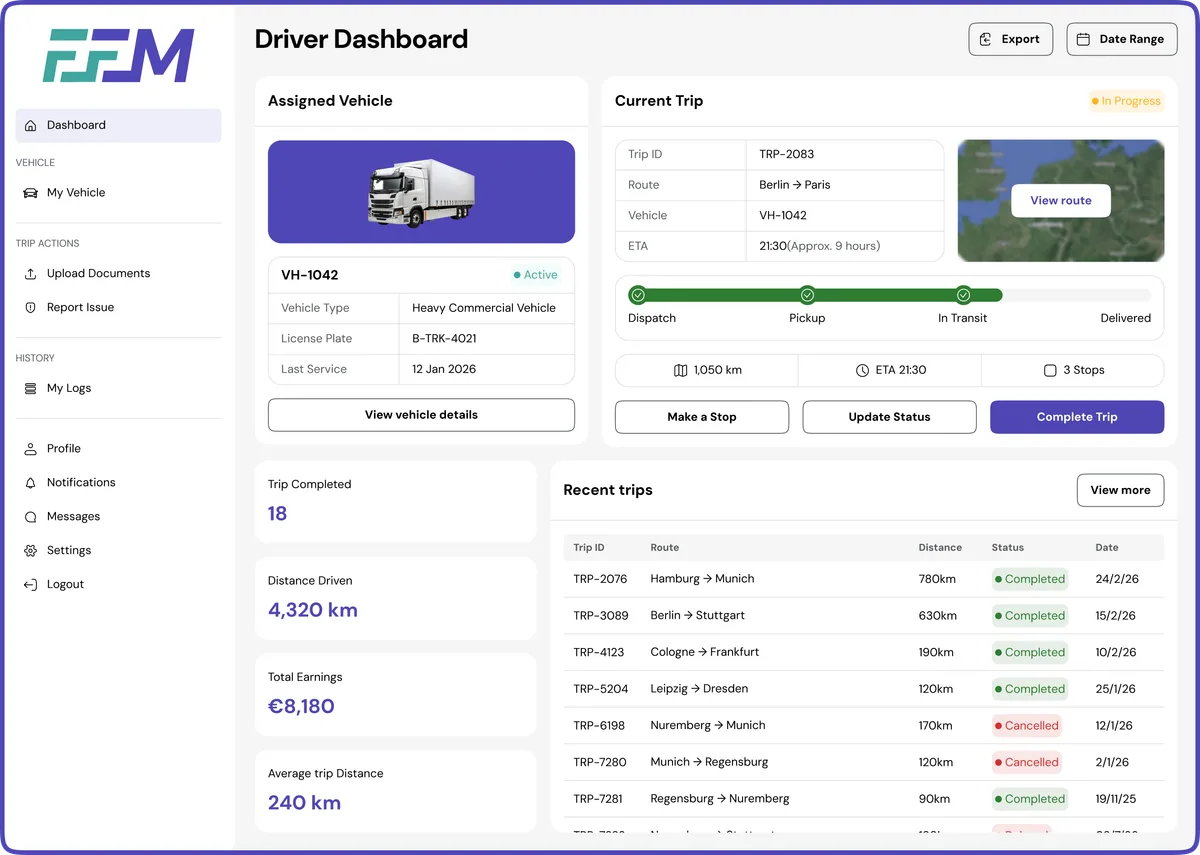
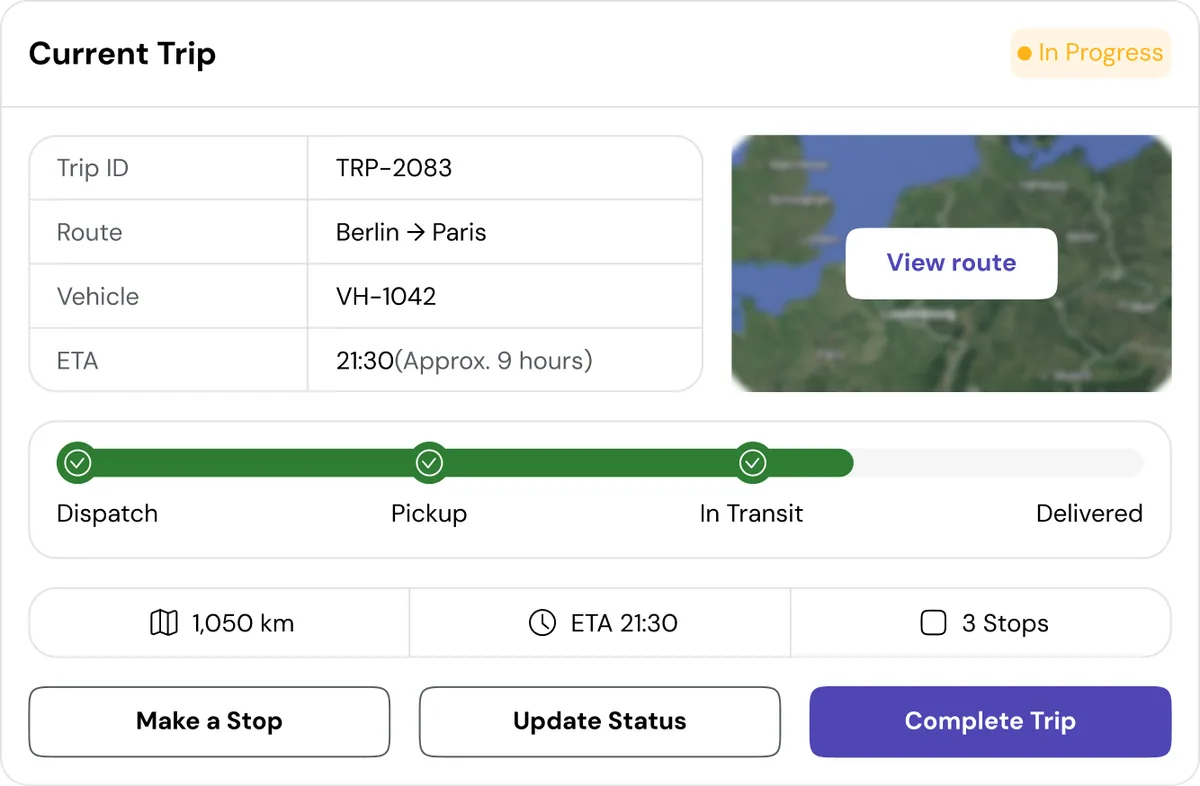
The Driver Dashboard provides drivers with a clear overview of their assigned vehicle, current trip details, and recent trip history. It highlights key trip information such as route progress, distance covered, and delivery status, allowing drivers to easily monitor their ongoing journey. The dashboard also enables quick actions like updating trip status, pausing a trip, or completing a delivery, ensuring smooth communication between drivers and fleet operations while maintaining accurate trip tracking.
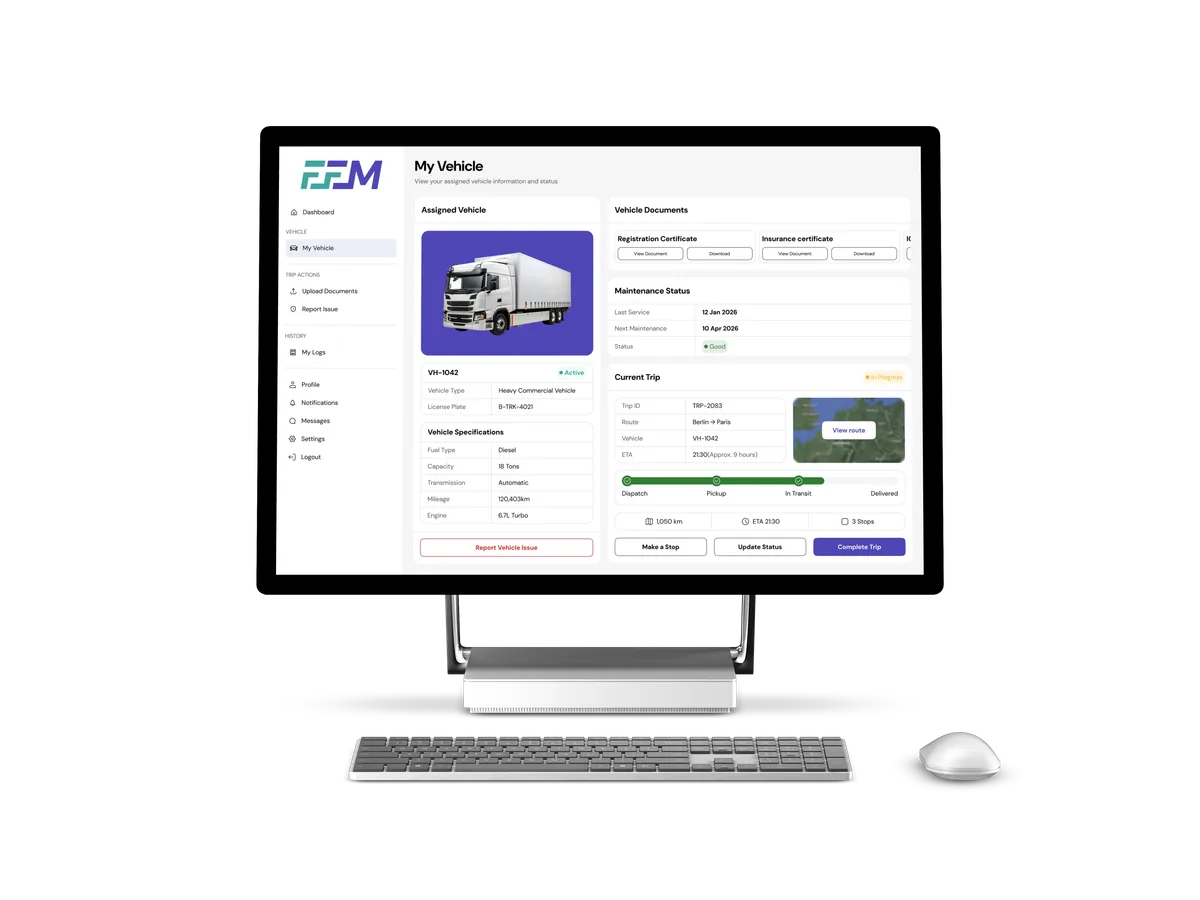
The My Vehicle screen gives drivers a detailed view of the vehicle assigned to them, including key specifications, maintenance status, and required documents. Drivers can quickly access registration and insurance documents, check the next scheduled maintenance, and monitor the health status of their vehicle. The screen also integrates current trip information and route progress, enabling drivers to stay informed while ensuring the vehicle remains compliant and ready for operations.
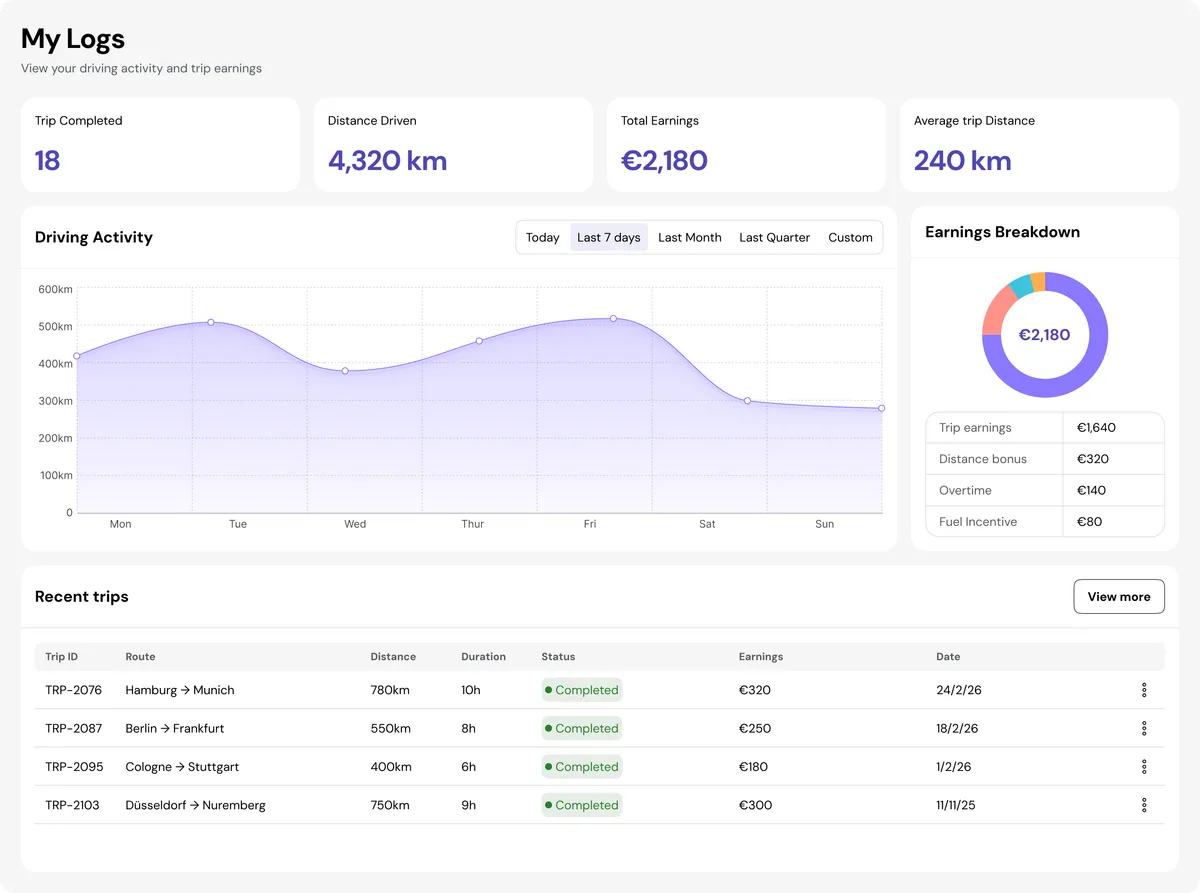
The My Logs screen allows drivers to track their driving activity, completed trips, and earnings over time. It provides insights into total distance driven, trips completed, and average trip distance, along with a visual breakdown of earnings from trips, bonuses, and incentives. The activity chart and recent trip history help drivers review their performance and stay informed about their work progress and compensation.
RESULTS
After deployment, the Full Fleet Management platform streamlined fleet operations, improved dispatch coordination, and significantly enhanced visibility across vehicles, drivers, and maintenance workflows.
Operations teams now manage assignments faster, reduce downtime, and make data-driven decisions through real-time insights.
+42%
Improved Fleet Visibility
Live monitoring and utilization insights allow managers to track vehicles, trips, and operational performance more effectively.
61%
Reduction in Operational Delays
Live monitoring and utilization insights allow managers to track vehicles, trips, and operational performance more effectively.
“ Improved efficiency across dispatch, maintenance, and fleet monitoring enabled smoother logistics execution and better operational reliability. “
Explore More
See how we solve real-world challenges through thoughtful design and engineering.
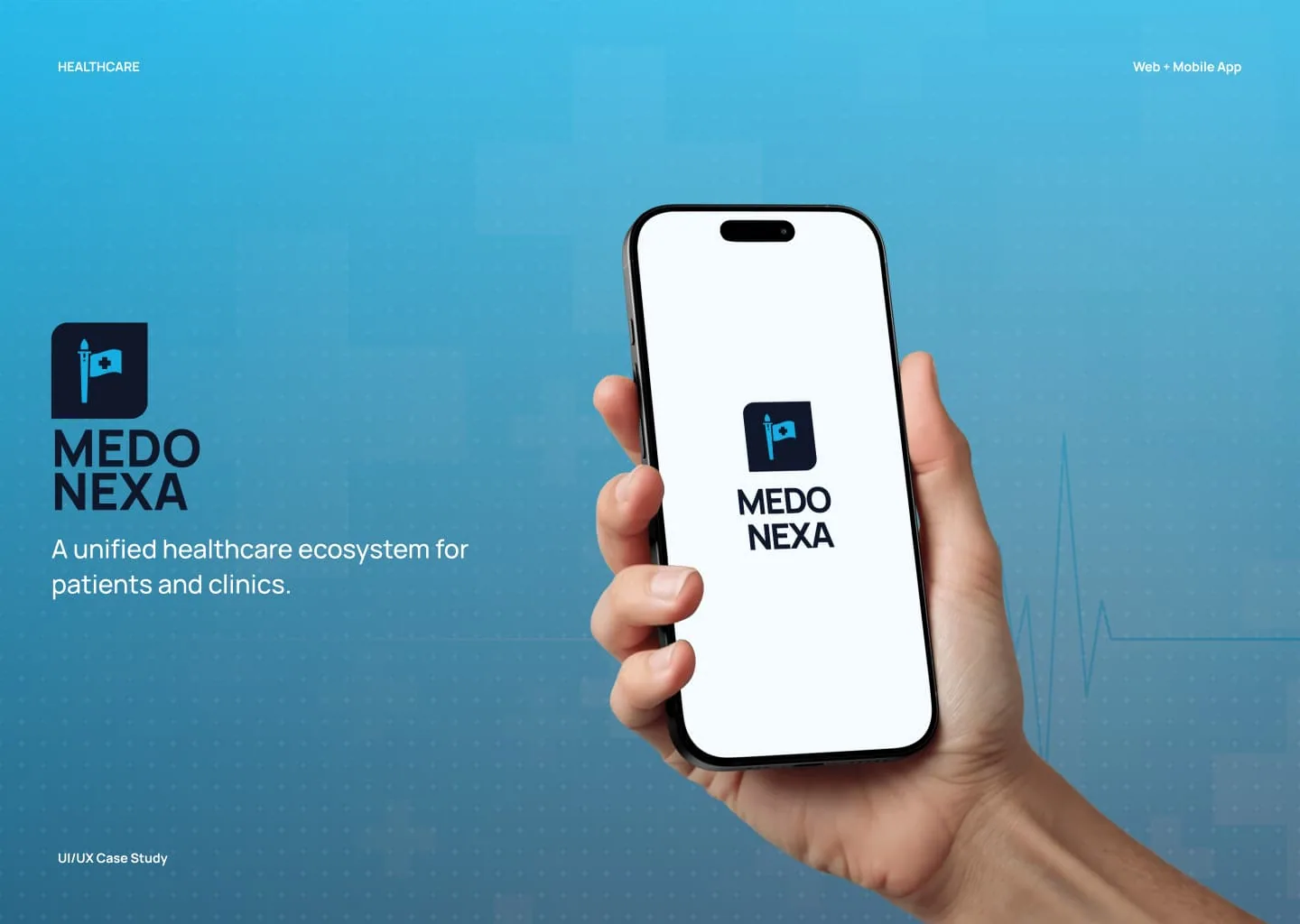
Healthcare Ecosystem
A modern healthcare appointment booking platform designed to simplify how patients access medical care and how clinics manage their daily operations.

Fintech | Mobile App | UI/UX Case Study
A modern digital wallet designed to simplify everyday payments, money transfers, and financial management with clarity, control, and security in one place.

Quick Commerce | Mobile App | UI/UX Case Study
A quick-commerce grocery platform designed to help urban users order everyday essentials with speed, clarity, and confidence — from discovery to doorstep.
We design and build digital products that solve real problems — from concept to launch. Tell us about your idea and let's bring it to life together.
50+
Projects Delivered
30+
Happy Clients
9+
Years of Experience
15+
Team Members