Cargo Sage web application shown on a Mac Studio workstation mockup

Cargo Sage — Logistics & Supply Chain Web Application Case Study

UI/UX Case StudyWeb ApplicationLogistics & Supply Chain

Platform

Web Application

Category

Logistics & Supply Chain

Type

UI/UX Case Study

Tools

Figma

Where movement meets intelligence!

CargoSage was built to redefine how logistics operations are planned, monitored, and optimized. In an industry driven by precision, speed, and reliability, we deliver intelligent tools that transform complex supply chains into seamless, data-driven systems.

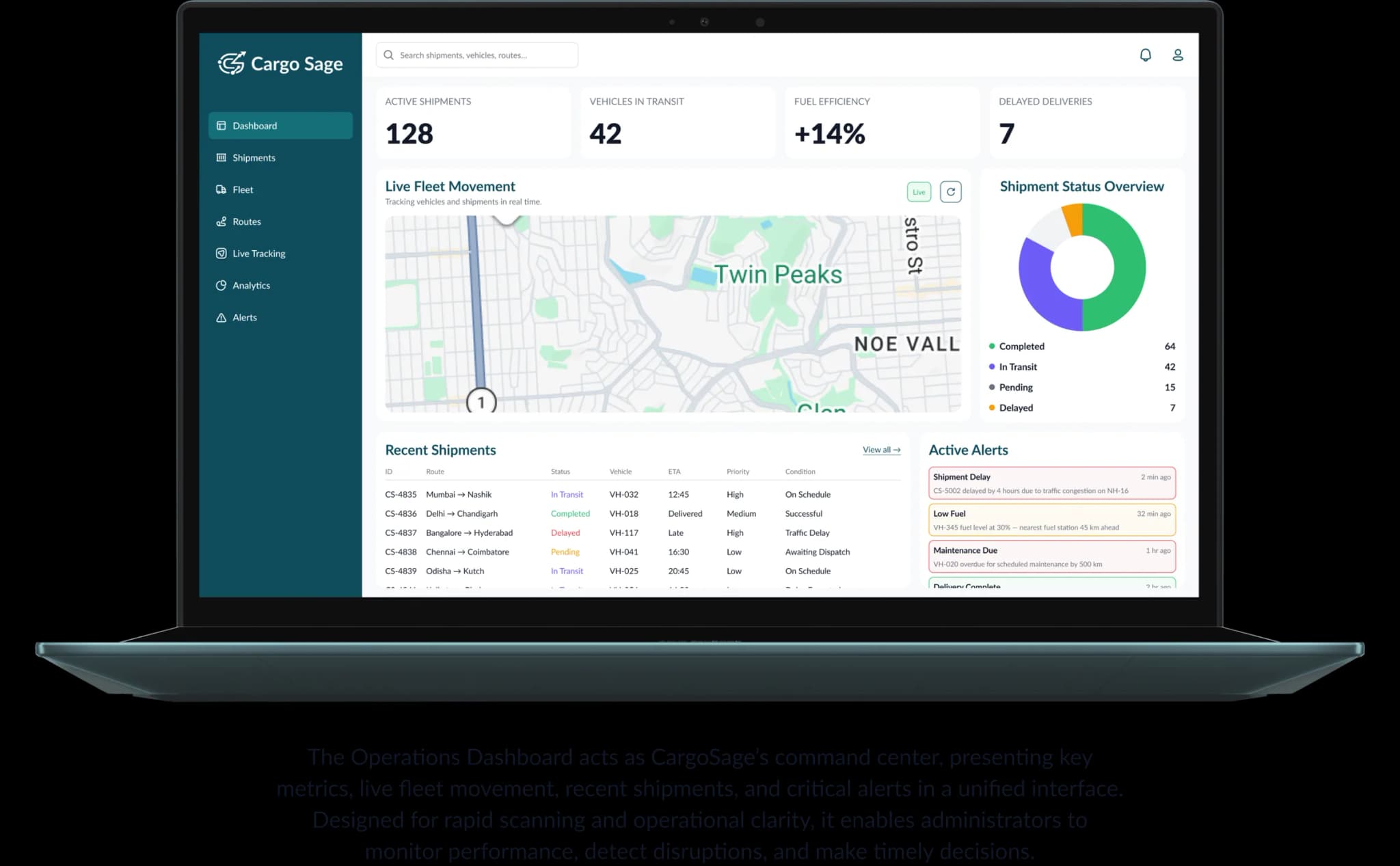
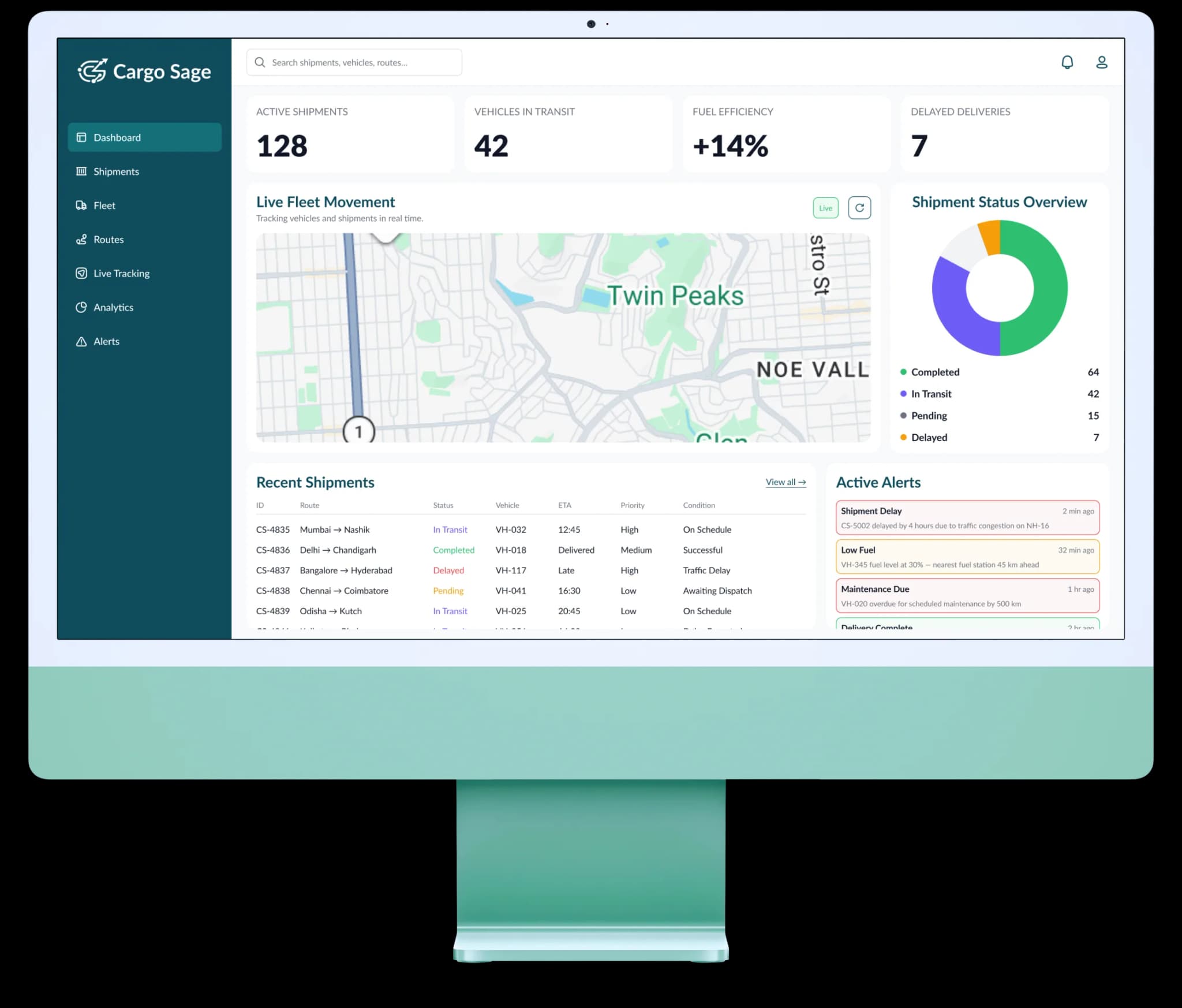
Cargo Sage logistics dashboard shown on an iMac

Design Process & Timeline

  1. Research & Discovery

    ~2 Weeks

    The project began with understanding the client’s logistics ecosystem, operational challenges, and limitations of their legacy system. Stakeholder discussions and requirement analysis helped uncover inefficiencies in routing, tracking visibility, documentation workflows, and analytics.
  2. Direct UI Exploration & Design

    ~5 Weeks

    Instead of creating separate low-fidelity wireframes, the design process moved directly into structured high-fidelity UI exploration. Layouts, workflows, and data hierarchies were iteratively designed in Figma, enabling faster validation of both visual and functional aspects simultaneously.

  3. Iteration & Refinement

    ~Iterative

    Design decisions were continuously refined through feedback and internal evaluations. Attention was given to improving data clarity, reducing cognitive load, enhancing status visibility, and supporting rapid operational scanning.

  4. Design Handoff & Support

    ~Ongoing

    Finalized designs were prepared with reusable components, design specifications, and interaction guidelines to ensure smooth collaboration with the development team.

Project Roadmap

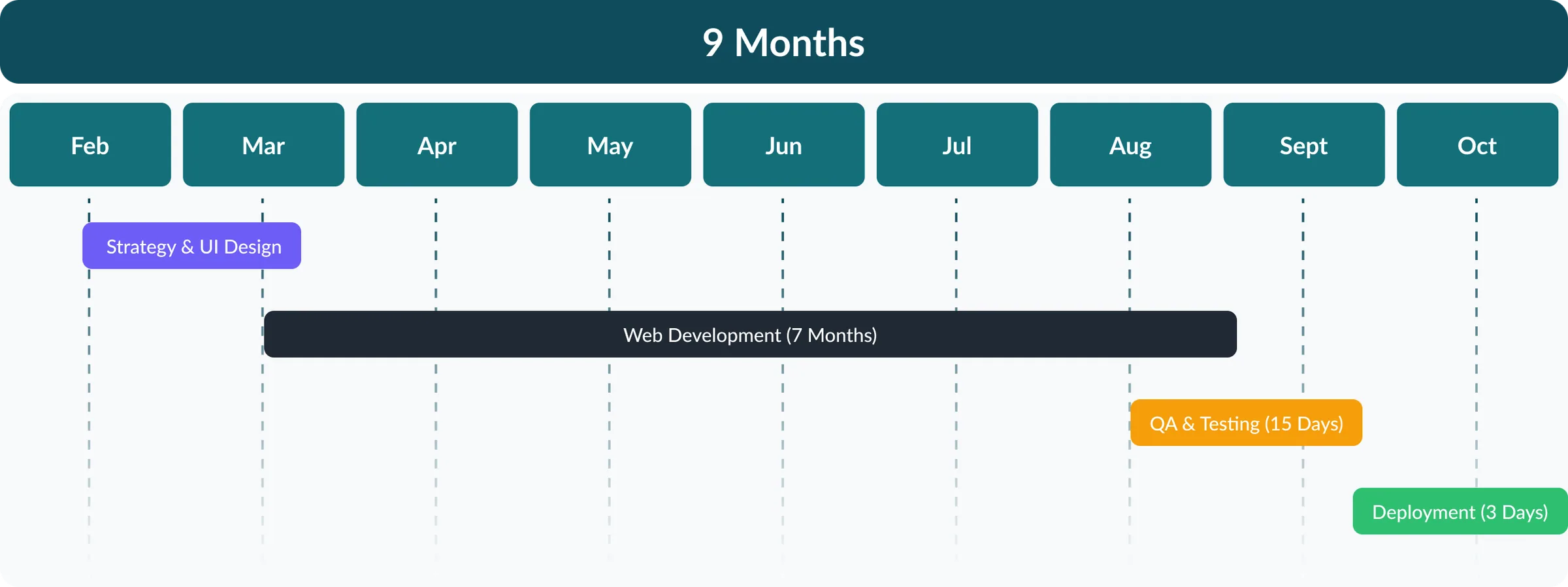
The CargoSage project was executed over a nine-month period, following a structured and phased delivery approach. The initial stage focused on research and UI design to establish a strong strategic and visual foundation. This was followed by an extended development cycle, ensuring scalability and system integrations. Final QA, testing, and deployment ensured the platform’s operational stability and readiness for real-world logistics use.

CargoSage 9-month roadmap — strategy & UI design, 7-month web development, QA & testing, deployment

Understanding the Problem

Research & Discovery

CargoSage was initiated for a mid-sized logistics company operating a fleet of approximately 250 vehicles across multiple delivery routes. As the business expanded, their legacy workflows began to strain — with limited visibility, fragmented data, and slow coordination across field and operations teams.

Problem Statement

The existing workflow relied heavily on manual processes, disconnected tracking mechanisms, and inefficient route planning. This resulted in rising fuel costs, missed delivery windows, and a lack of real-time insight into fleet performance.

Key Challenges

  • Lack of Real-Time Visibility

    The absence of live tracking created operational blind spots, delayed interventions, and reduced customer transparency.

  • Manual Documentation Errors

    Paper-based workflows increased the likelihood of human error, processing delays, and data inconsistencies.

  • Limited Data & Insights

    Without structured analytics, decision-making remained reactive rather than data-driven.

  • Declining Customer Satisfaction

    Delivery inaccuracies and poor communication negatively influenced client trust and retention.

Design Objectives

  • Streamlining logistics workflows
  • Enabling real-time operational visibility
  • Improving route efficiency & fuel optimization
  • Reducing manual errors through automation
  • Creating an intuitive, low-friction user experience
  • Delivering actionable performance insights

Solution Strategy

CargoSage was designed as a unified logistics management platform aimed at transforming fragmented, manual-heavy operations into a streamlined digital system. The strategy focused on improving operational visibility, optimizing route efficiency, automating documentation workflows, and enabling data-driven decision-making.

Operational Visibility

Enabled real-time tracking of vehicles and shipments, reducing blind spots and allowing faster intervention during disruptions.

Route Optimization

Integrated AI-driven route planning to minimize fuel consumption, reduce delivery delays, and improve fleet efficiency.

Workflow Automation

Replaced manual documentation with digital processes, significantly lowering errors and processing time.

Data & Performance Insights

Delivered analytics dashboards to support proactive decision-making and performance monitoring.

Exception & Alerts System

Designed intelligent alerts to identify delays, deviations, and risks before they escalated.

User-Centric Experience

Focused on scannable layouts, clear hierarchy, and low cognitive load for operations-heavy environments.

User Story

Operations Administrator

As an Operations Admin, I want to manage shipments, monitor live operations, and resolve alerts so that logistics workflows run smoothly without disruptions.

  • I want to see all shipments and fleet activity in one place so that I can quickly understand operational status.
  • I want real-time tracking visibility so that I can respond to live operational issues.
  • I want a clean, scannable dashboard so that decisions can be made under pressure.
  • I want to detect delays and exceptions instantly so that corrective action can be taken before escalation.
  • I want to reassign vehicles or routes efficiently so that delivery schedules remain intact.
Business Administrator

As a Business Admin, I want access to analytics, performance metrics, and system reports so that I can make data-driven decisions and improve operational outcomes.

  • I want to identify recurring operational issues so that long-term improvements can be made.
  • I want fleet utilization metrics so that resources are optimally allocated.
  • I want structured reports and exports so that stakeholders can review performance.
  • I want visibility into delivery performance trends so that I can evaluate operational efficiency.
  • I want fuel consumption and cost insights so that I can control expenses.

Branding

CargoSage web application shown inside a browser mockup with the product URL bar and logo-marked tab
Cargo Sage logotype and mark on a pale teal background
Cargo Sage logo mark — deep teal geometric logomark on white
Cargo Sage brand applied to an illuminated street sign
CargoSage branding environmental mockup showcasing the identity in context

Defining Identity Using — Font

Lato

Weights

  • Regular
  • Medium
  • Bold
  • Black

Type Scale

  • 48px
  • 32px
  • 24px
  • 18px
  • 16px
  • 14px
  • 12px

Character Set

  • abcdefghijklmnopqrstuvwxyz
  • ABCDEFGHIJKLMNOPQRSTUVWXYZ
  • 0123456789 / * - + @ # % * \

Defining Identity Using — Color

Brand Deep

0F4C5C

Ink

111827

Brand Primary

136F7A

Muted Text

6B7280

Brand Tint

E6F4F6

Warning

F59E0B

Border

E3E5E8

Error

E5484D

Surface

F7F9FB

Success

2FBF71

Divider

E5E9F0

Accent

6D5DF6

Iconography

CargoSage iconography set — 52 core UI icons used across the logistics dashboard including truck, route, dashboard, search, notifications, document, settings, and navigation controls

Visual Design

Dashboard

CargoSage dashboard overview with live operations summary, shipment counts, and fleet activity
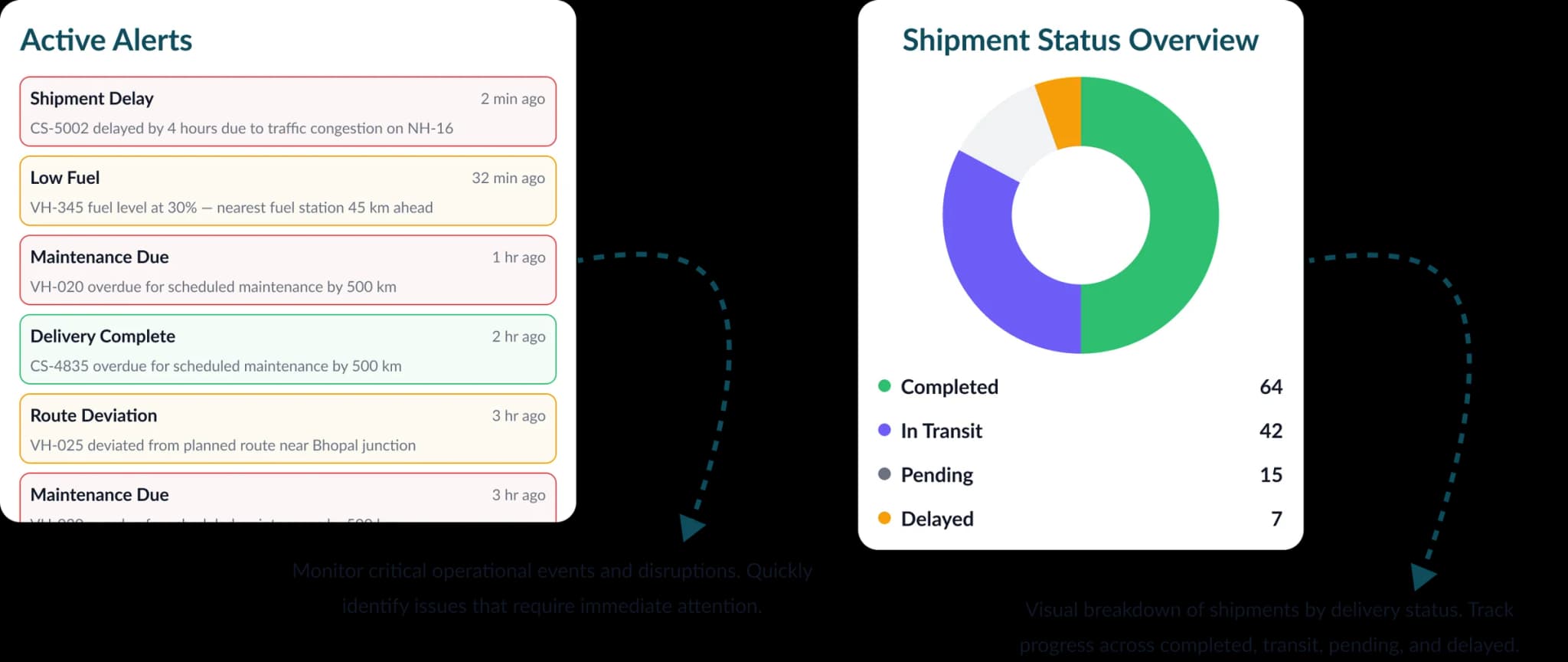
CargoSage dashboard secondary panels — performance metrics and alerts

Shipments

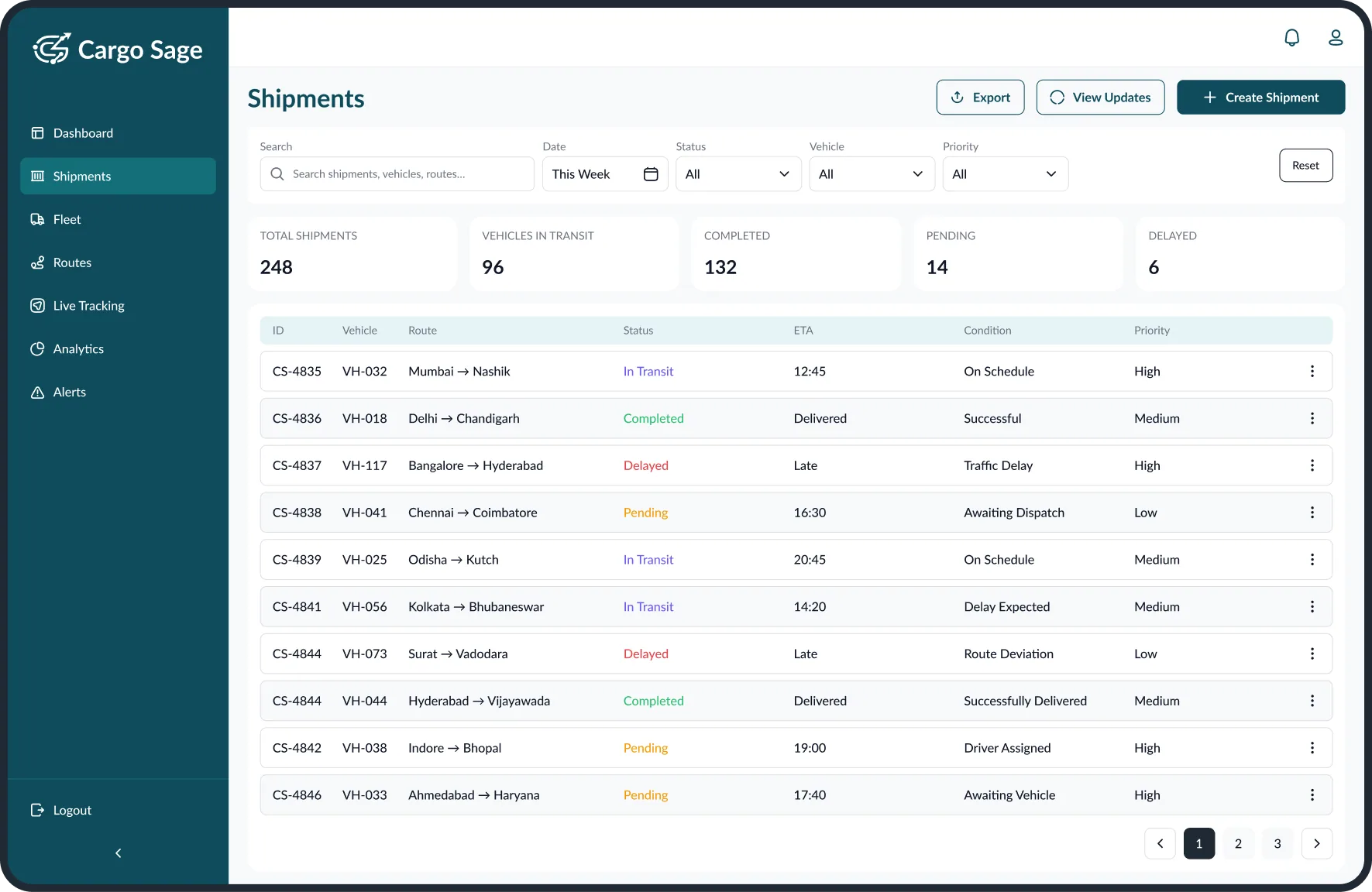
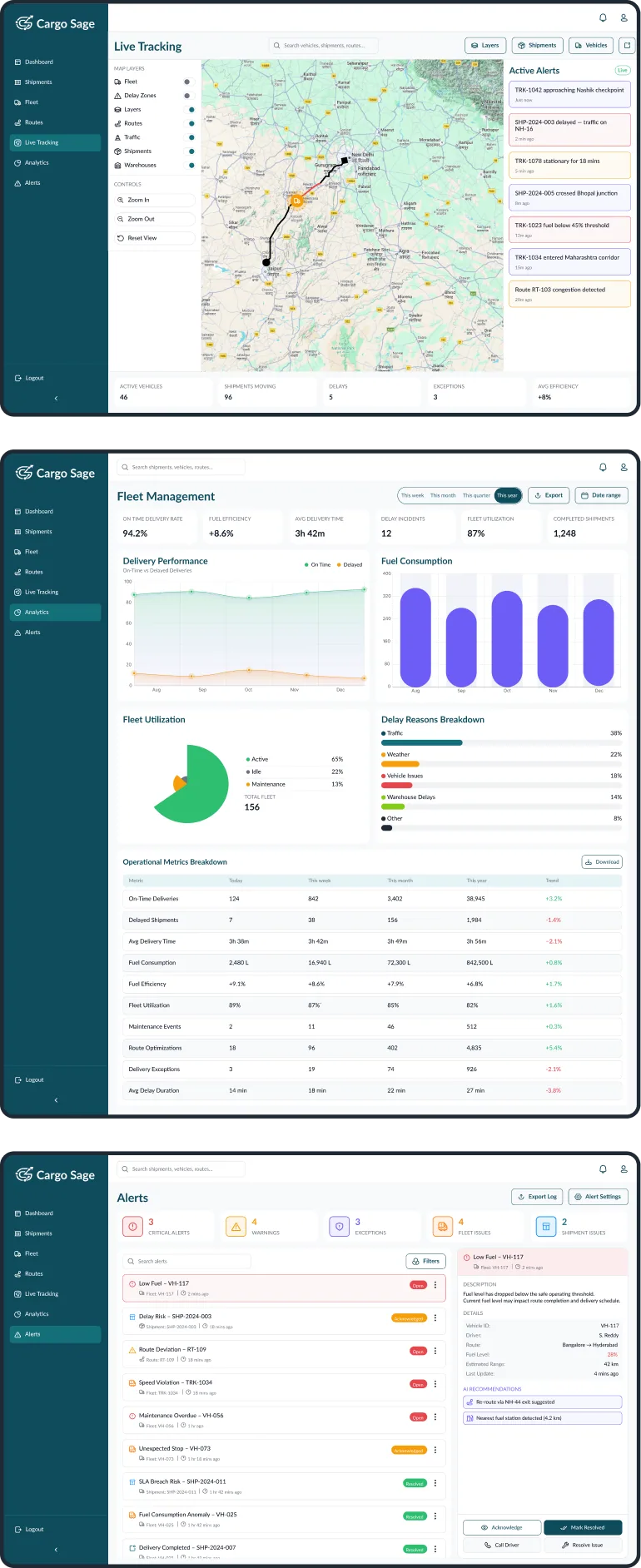
The Shipments module provides a centralized view of all deliveries, enabling administrators to monitor statuses, ETAs, routes, and priorities. Designed for fast scanning and operational clarity, it simplifies shipment tracking, filtering, and management.

Shipments module — table view showing deliveries, statuses, ETAs, routes, and priorities

Add Shipment

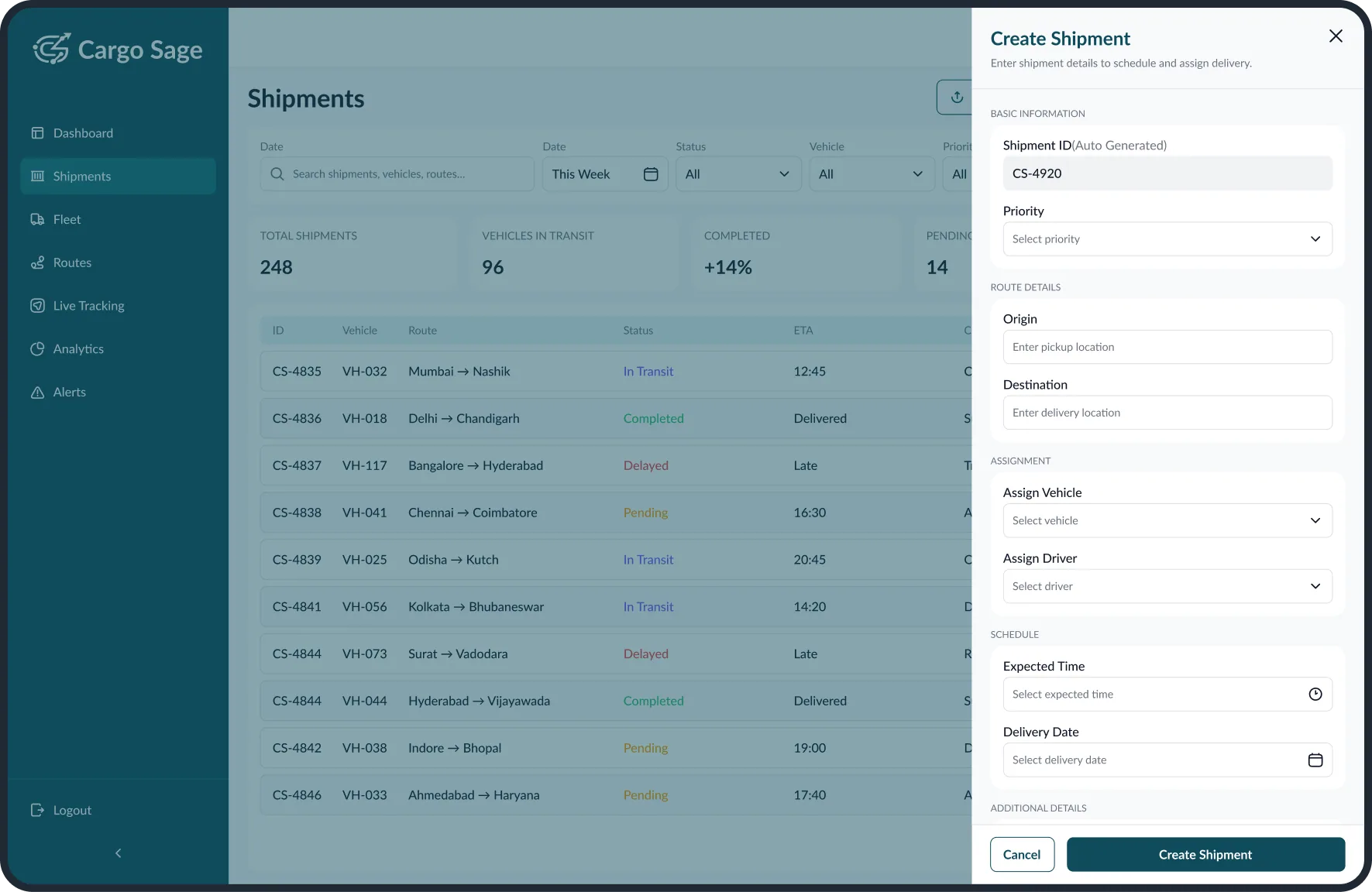
The Create Shipment workflow enables quick and structured entry of delivery details, including route, vehicle, driver, and schedule. The drawer-based design minimizes disruption while ensuring accuracy and efficiency in dispatch operations.

Add Shipment drawer with route, vehicle, driver, and schedule fields

Analytics & Insights

Analytics surfaces performance trends, fuel consumption, fleet utilization, and delivery KPIs through scannable cards and data-dense charts — built for operators making decisions under pressure.

CargoSage analytics — performance summary cards and data-dense charts
CargoSage analytics — secondary performance breakdown and reports

Routes

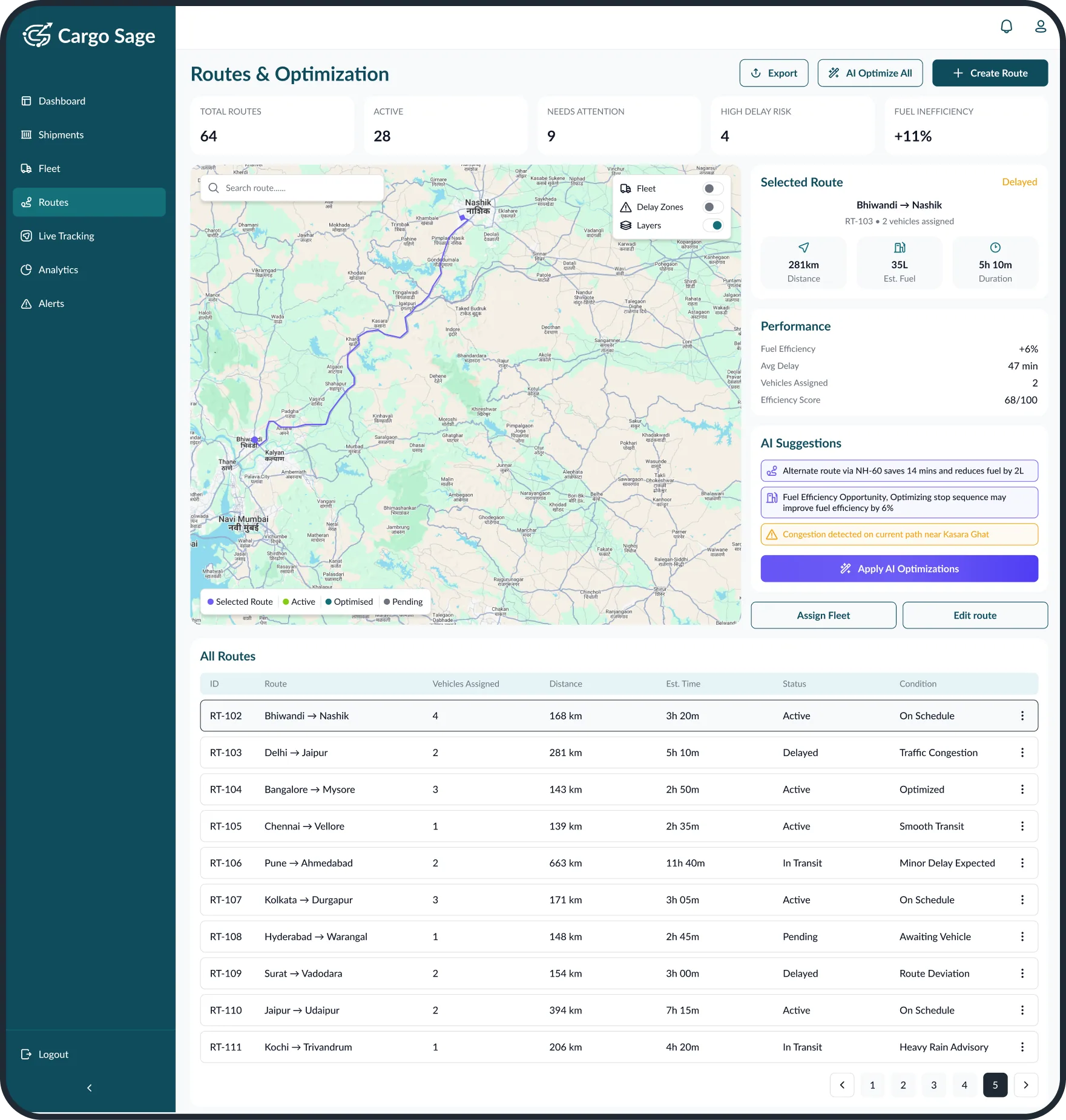
The Routes & Optimization module enables administrators to monitor delivery routes, performance metrics, and potential risks from a centralized interface. An interactive map combined with AI-driven suggestions supports faster analysis, improved efficiency, and smarter route planning.

Routes & Optimization module with interactive map and AI-driven route suggestions

Live Tracking

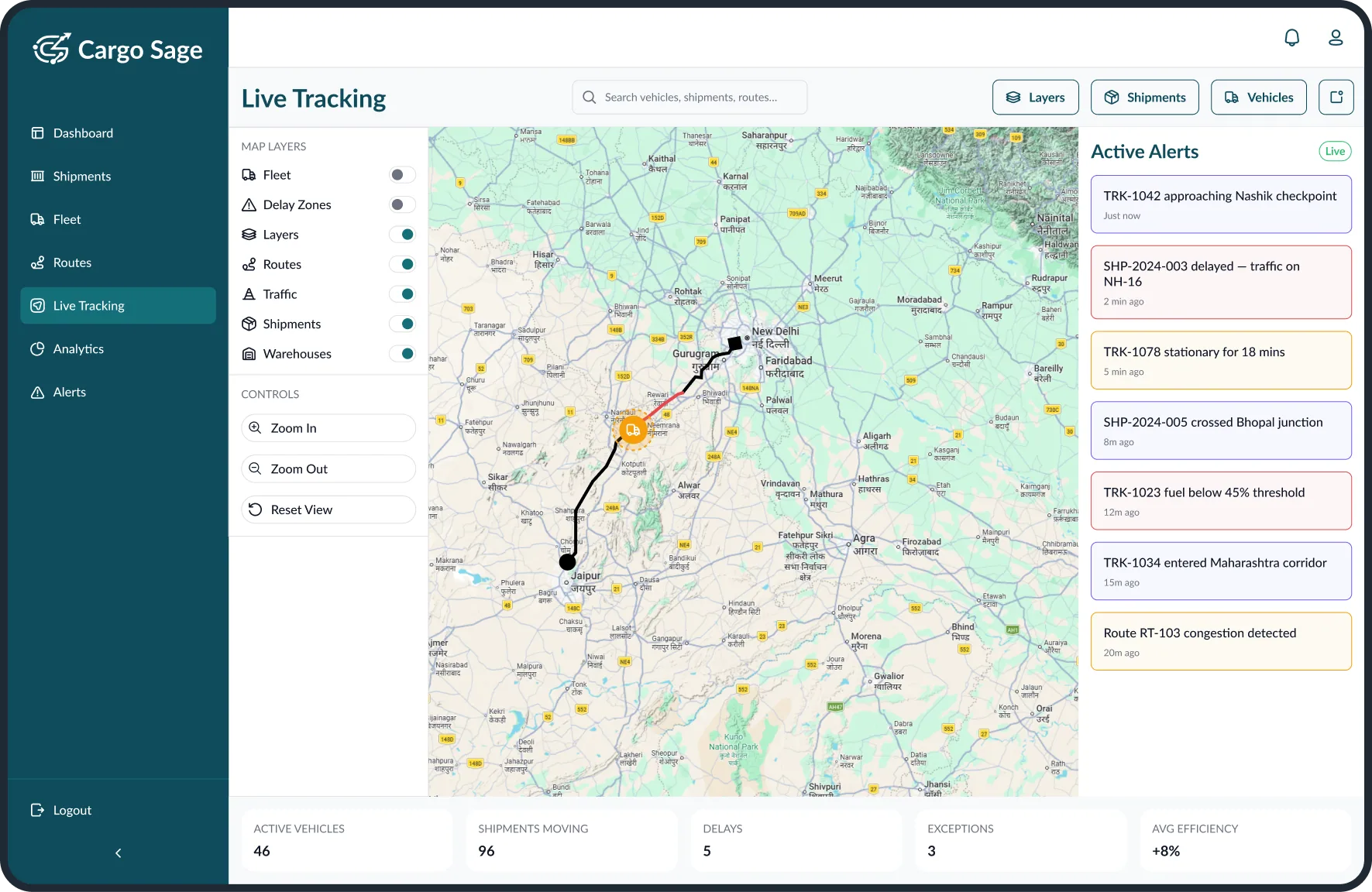
The Live Tracking module provides real-time visibility into vehicle movements and active shipments through an interactive map interface. Administrators can monitor routes, detect delays, and respond to operational events as they occur. Integrated alerts and layer controls enable quick identification of disruptions, deviations, and risks.

Live Tracking module showing real-time vehicle positions, routes, and alerts on an interactive map

24+ Screens

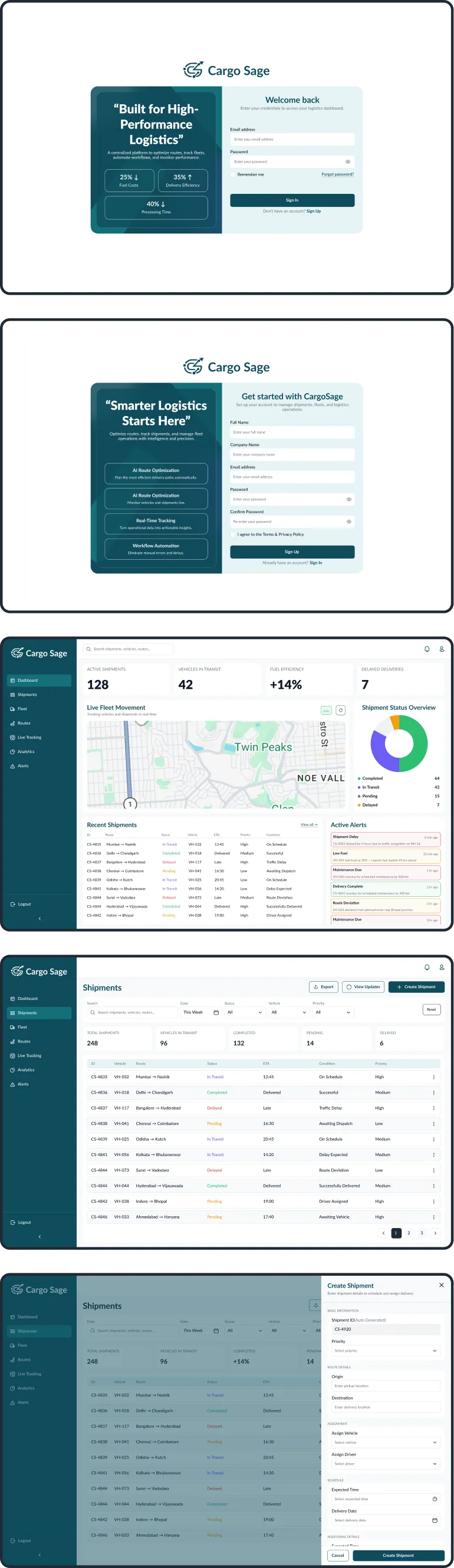
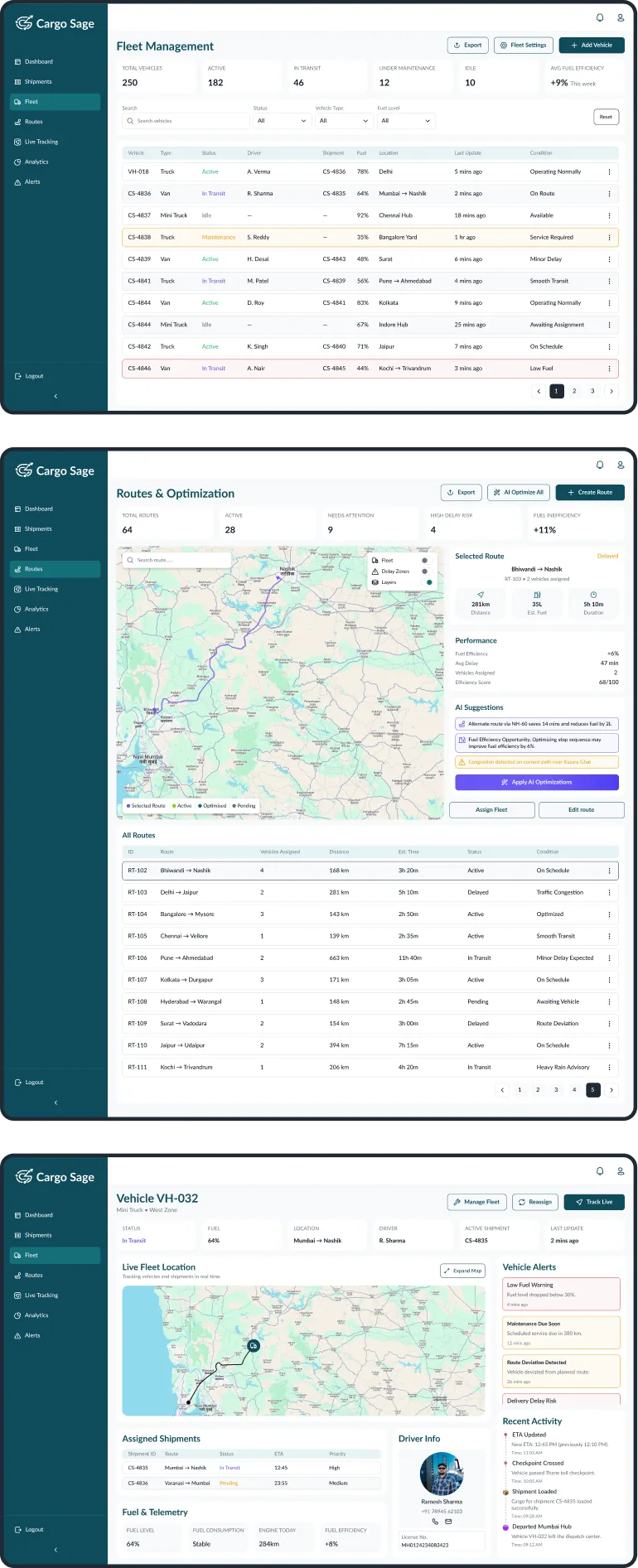
Column 1 — Login, Register, Dashboard, Shipments, Add Shipment mobile screens
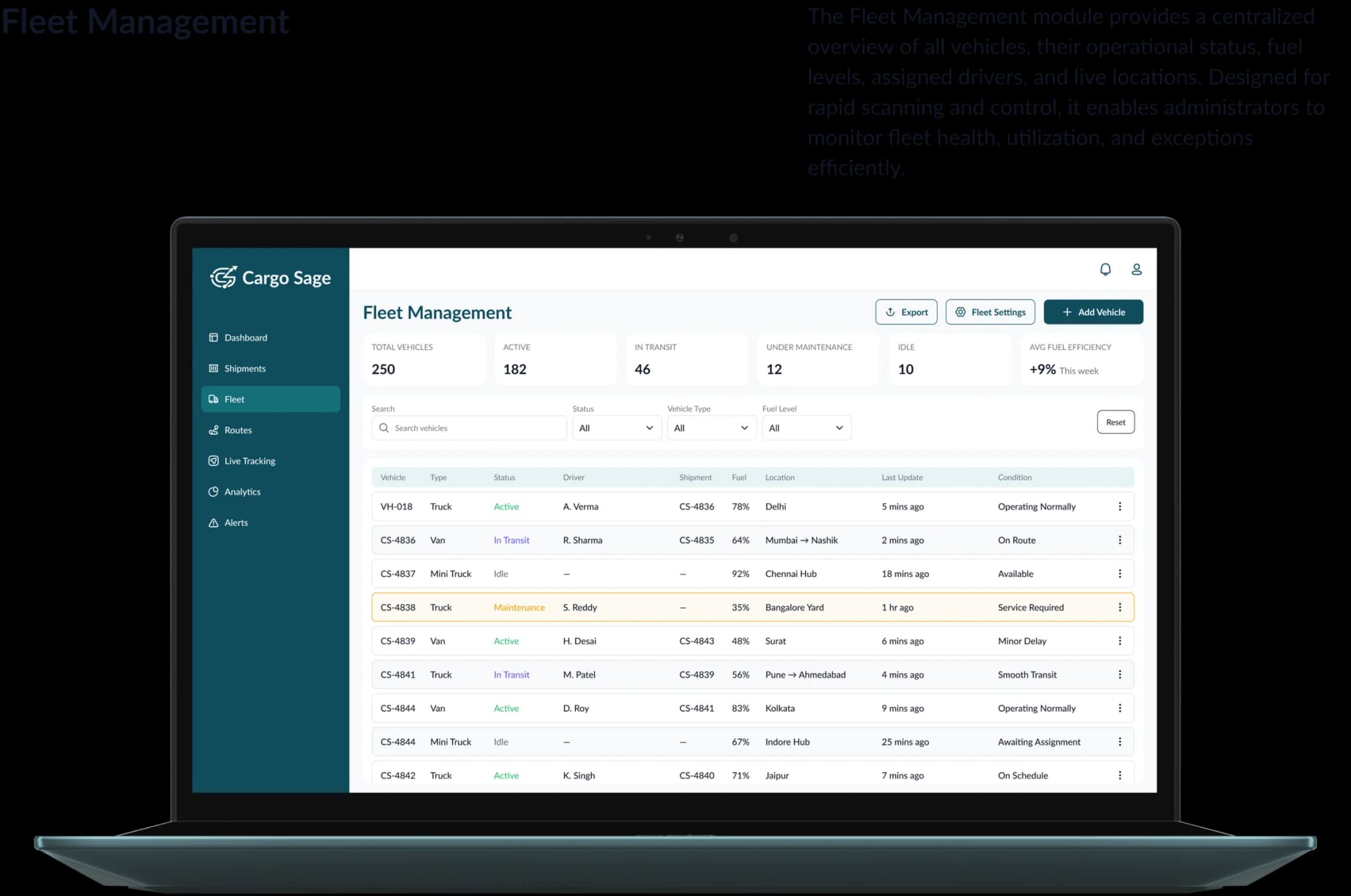
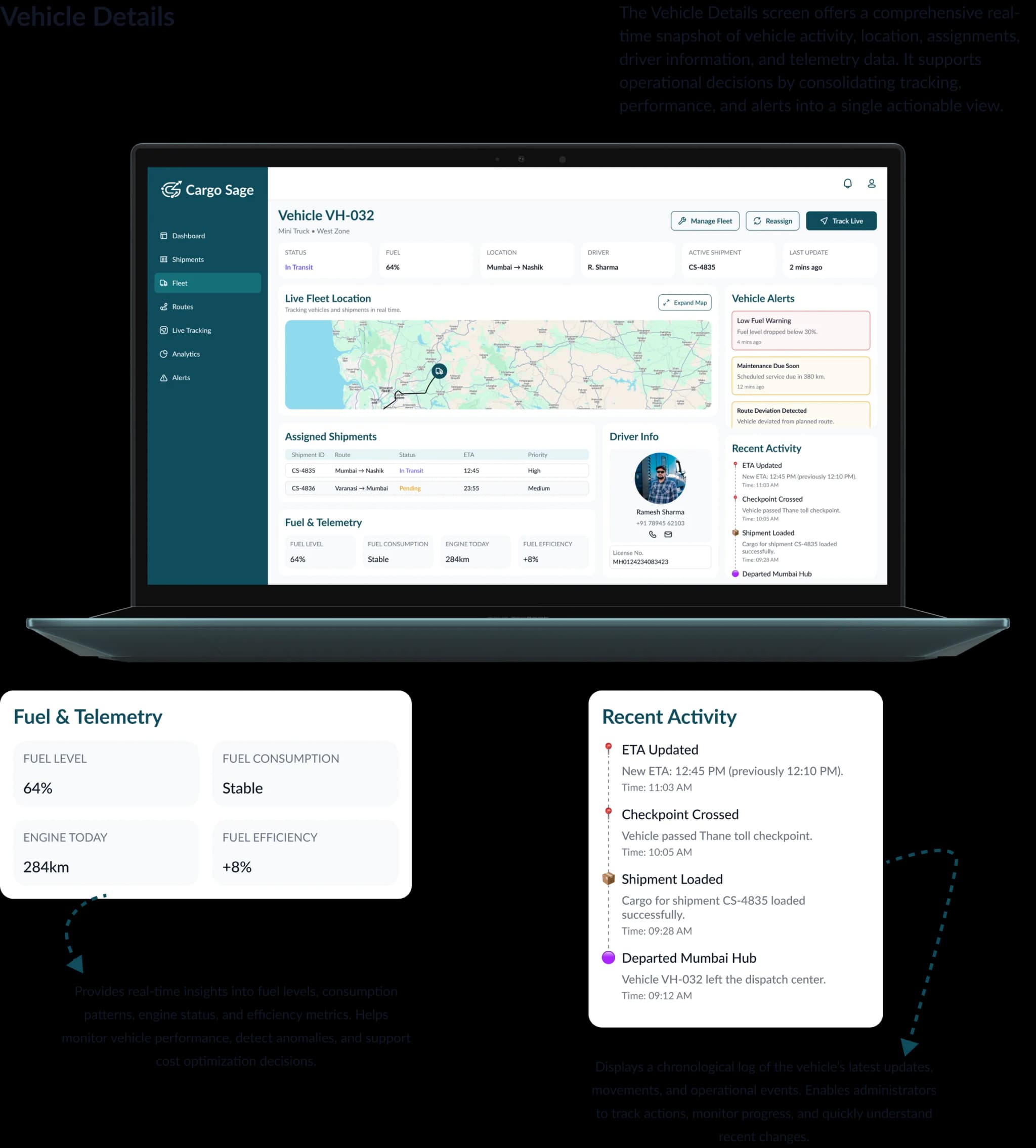
Column 2 — Fleet, Routes, View fleet mobile screens
Column 3 — Live tracking, Analytics, Alerts mobile screens

Explore More

More Case Studies

See how we solve real-world challenges through thoughtful design and engineering.

Let's Work Together

Have a Project in Mind?

We design and build digital products that solve real problems — from concept to launch. Tell us about your idea and let's bring it to life together.

50+

Projects Delivered

30+

Happy Clients

9+

Years of Experience

15+

Team Members